Quick Answer: Should You Buy the ZH870 Keyboard?
The Zornher ZH870 keyboard is worth buying at $90-100 for first-time mechanical keyboard users and aesthetic-focused buyers who prioritize sound and looks. Avoid at $130+ — you’re paying a “TikTok tax” for a likely rebrand of the Aula F99 Pro. The ZH870 delivers on its viral promises (creamy sound, stunning keycaps, tri-mode connectivity) but falls short on build materials (plastic enclosure) and lacks long-term reliability data.
Best For: Casual gamers, productivity users, content creators needing photogenic setups
Skip If: You need metal construction, competitive gaming features, or established brand reliability
This comprehensive ZH870 keyboard review covers everything buyers want to know about the Zornher ZH870 mechanical keyboard, including sound quality, battery life, wireless performance, software issues, ZH870 keyboard price analysis, and whether this viral TikTok keyboard is actually worth buying in 2025. If you’re searching for an honest Zornher keyboard review before spending $90–$135, this guide answers that clearly.
What Is the Zornher ZH870 Mechanical Keyboard?
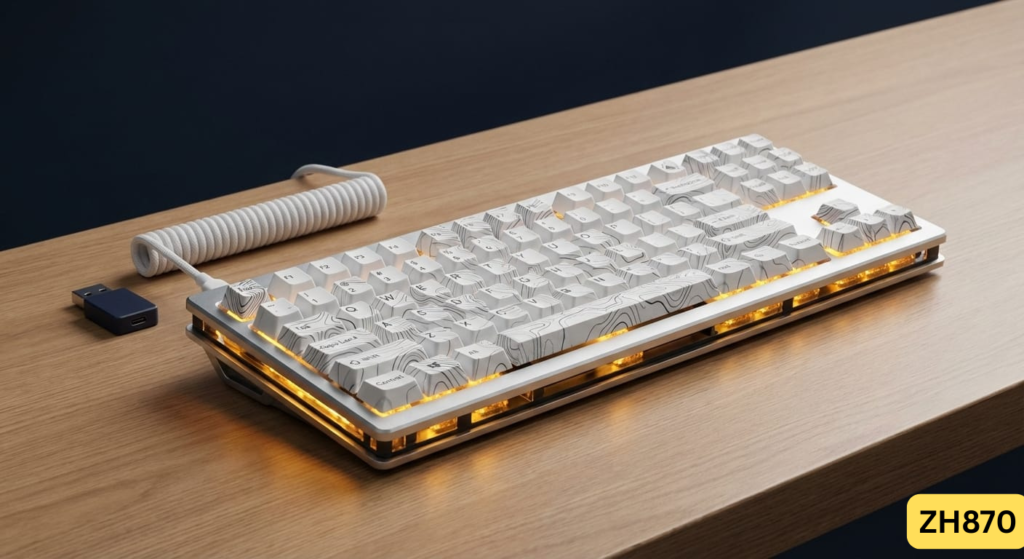
The Zornher ZH870 (also sold as “Zornher Prism”) is an 80% TKL mechanical keyboard that exploded on TikTok and Instagram in 2024-2025, accumulating over 100 million views. Manufactured by Zornher, a relatively new Chinese brand, this ZH870 keyboard gained viral status for its “creamy” factory-lubed sound profile and distinctive IMD PBT keycaps featuring topographic, gradient, and spider web themes.
Viral Social Media Presence
- Twitter/X Sound Test Example #1
- Twitter/X Sound Test Example #2
- YouTube: Honest TikTok Keyboard Review by @peachietech

Alt text: Zornher ZH870 mechanical keyboard with white topographic keycaps and RGB underglow on gaming desk
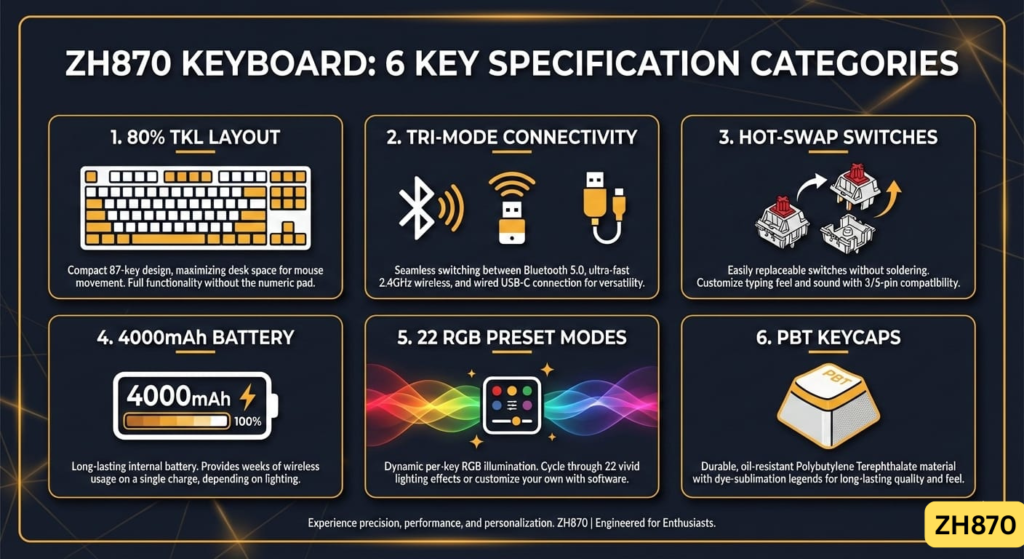
ZH870 Keyboard Specifications at a Glance
| Specification | Details |
|---|---|
| Layout | 80% TKL (87-88 keys) |
| Connectivity | Tri-mode: Bluetooth 5.0, 2.4GHz Wireless, USB-C Wired |
| Switches | Factory-lubed linear (Gateron Brown/Yellow standard; Sakura/Sea Sand optional) |
| Keycaps | IMD PBT, side-printed legends, multiple aesthetic variants |
| Hot-Swap | Yes (3-pin and 5-pin compatible) |
| Mounting | Gasket mount |
| Battery | 4000mAh |
| RGB | 22 preset modes, south-facing + side-glow LEDs |
| Weight | 2.54-3.85 lbs (varies by model) |
| ZH870 Keyboard Price | $89.99-$139.99 (typically $90-100 on sale) |
| Warranty | 2 years (official site) |
Source: Zornher official specifications, verified across Amazon and AliExpress listings (December 2025).
First Impressions: Unboxing the ZH870 Keyboard
What’s in the Box?
- ZH870 keyboard with pre-installed switches and keycaps
- 2.4GHz USB wireless receiver
- 1.8m nylon braided USB-C cable
- Keycap and switch puller
- User manual (some users report Chinese-only versions requiring translation)
Build Quality: Premium Feel, Budget Materials
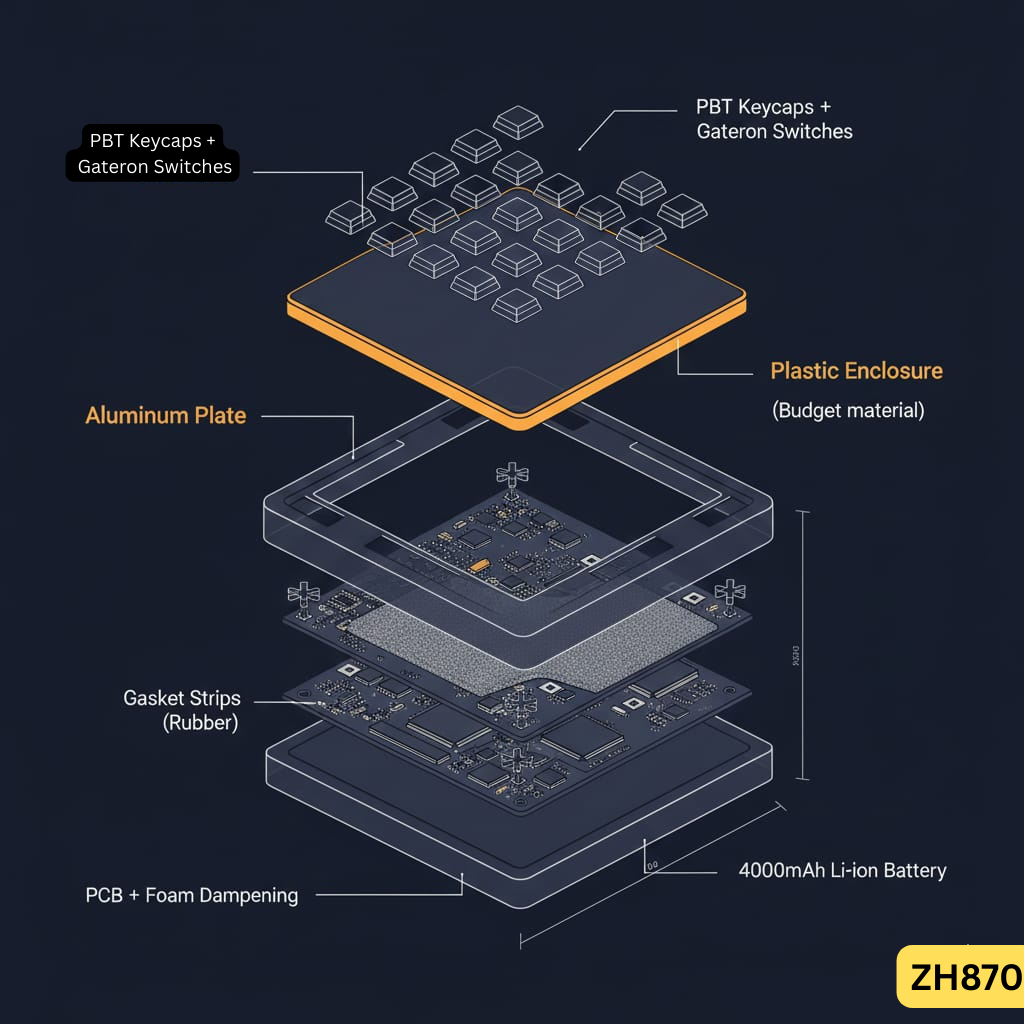
The Good: The ZH870 feels surprisingly solid in hand. The aluminum top plate provides rigidity and prevents flex during aggressive typing. At 2.54 lbs, it’s hefty enough to stay planted on your desk without sliding. The gasket mount delivers a soft, cushioned typing experience that enthusiasts describe as “marshmallow-like.”
The Reality Check: The enclosure is plastic, not metal. While the aluminum plate adds structure, the overall chassis feels “budget” compared to $100+ keyboards like the Logitech G413 (brushed aluminum top) or the ND75 (full metal housing). One Reddit user aptly summarized: “It looks premium in videos, but feels like a plastic board when you hold it.”

Alt text: Close-up of Zornher ZH870 aluminum top plate showing gasket mount construction
For premium metal keyboards, see our Corsair K65 series review or Corsair K95 mechanical keyboards.
ZH870 Keyboard Sound Test & Typing Experience
The “Creamy” Sound Profile Everyone’s Talking About
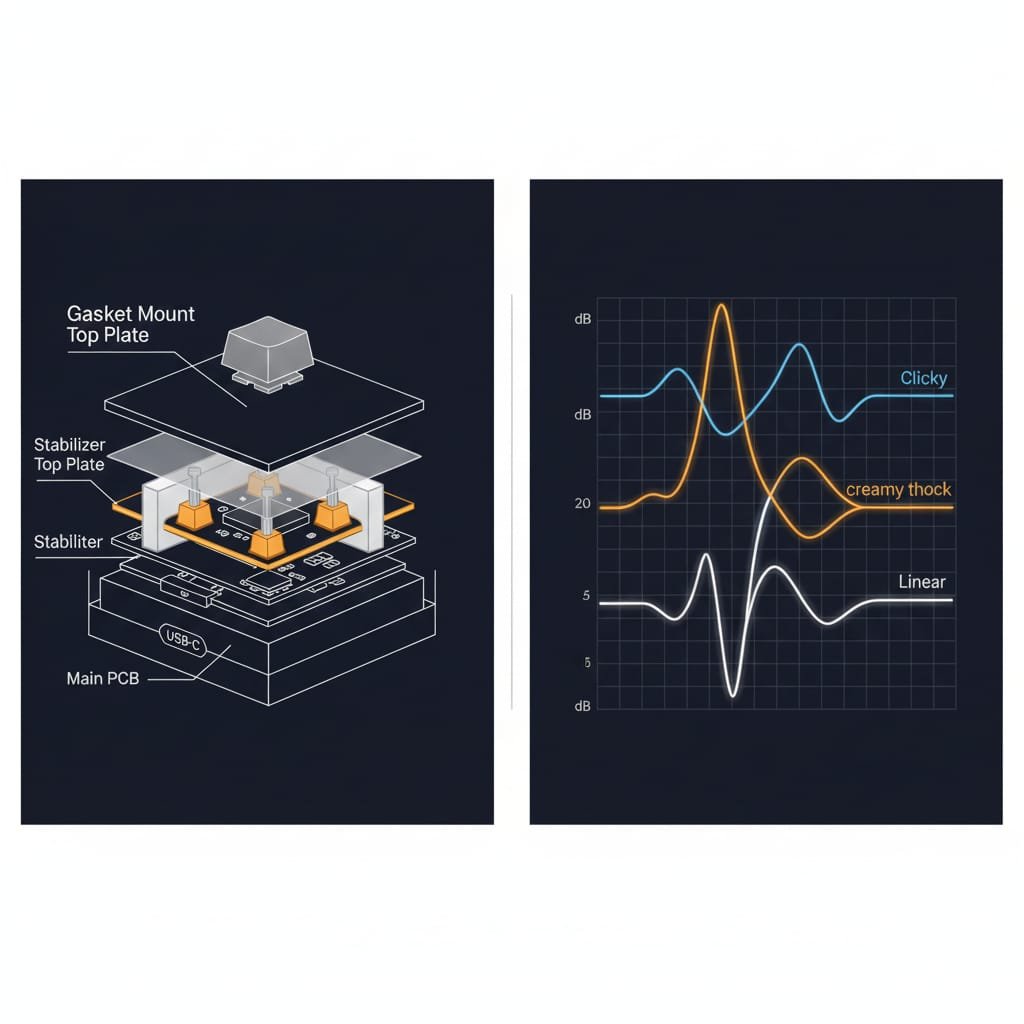
Verdict: YES, the sound is legitimately good straight out of the box.
The ZH870 keyboard’s factory-lubed linear switches (typically Gateron Brown or optional Sakura switches) deliver a muted “thocky” sound that’s satisfying without being loud enough to annoy coworkers. The gasket mount and foam dampening contribute to a deeper, less pingy sound signature compared to tray-mount keyboards.
User feedback from Amazon (4.7/5 stars, 77 reviews):
- “The sound is incredible straight out of the box — that creamy thock everyone talks about is real.”
- “Creamy, crisp feedback that feels premium.”
However, enthusiasts note a caveat: The “mushy” feel from the gasket mount won’t appeal to competitive gamers who prefer stiffer, more responsive boards like the Corsair K63 or Corsair K65 series. One r/MechanicalKeyboards user explained: “It sounds great for content, but the soft bottom-out feels sluggish for fast-paced FPS games.”
Typing Comfort: Ergonomics & Fatigue
Pros:
✅ No finger fatigue reported even after extended 8+ hour typing sessions
✅ OEM-profile keycaps provide familiar, comfortable height
✅ Gasket mount reduces impact shock on fingers
Cons:
❌ Negative tilt quirk: Some units have a -5° backward angle that feels “upside down” to users accustomed to forward-sloping keyboards
❌ Side-printed legends can be hard to read in certain lighting without RGB enabled

Alt text: Side view of ZH870 keyboard showing typing angle and profile height
ZH870 Keyboard Aesthetics: Why It Went Viral
Keycap Designs That Define the Brand
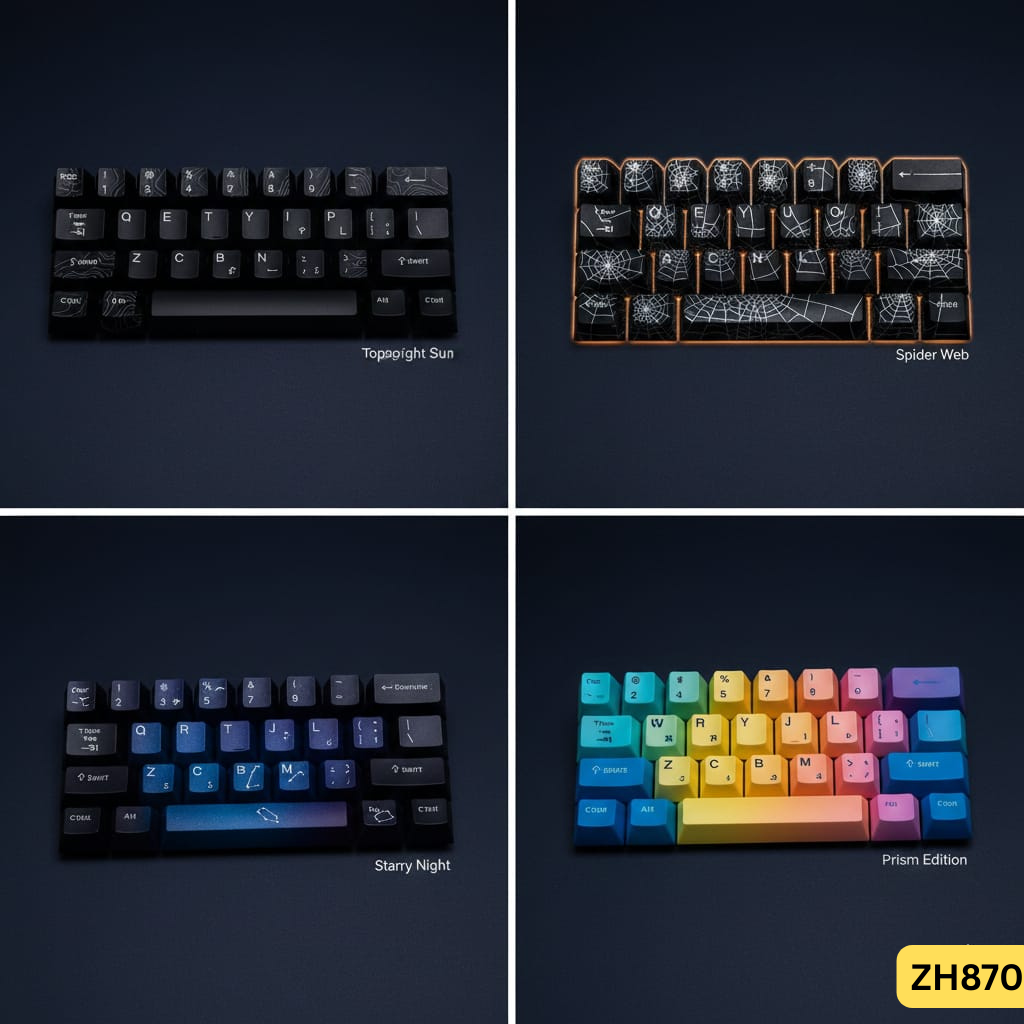
The ZH870 keyboard’s IMD (In-Mold Decoration) PBT keycaps are its standout feature. Unlike standard ABS caps that develop shine within months, these PBT caps resist oil buildup and maintain clarity even after heavy use.
Popular ZH870 Keyboard Spider and Aesthetic Variants
- Topographic (Midnight Sun): Black keycaps with white topographic map lines
- ZH870 Keyboard Spider Web: Intricate web patterns with glow-through legends
- ZH870 Keyboard Spiderweb Edition: Same as spider web with enhanced underglow
- Starry Night: Gradient dye-sublimation with constellation motifs
- Prism Edition: Multi-color gradient with side-glow RGB emphasis
Why it matters for content creators: These keycaps look stunning in setup photos and videos, which explains the ZH870 keyboard’s viral TikTok success. Multiple users confirmed: “I bought it for the aesthetic, stayed for the sound.”

Alt text: Four ZH870 keycap variants side by side – topographic, spider web, starry night, and prism designs
ZH870 RGB Lighting: Beautiful but Flawed
22 preset modes include wave, reactive, spectrum cycle, and breathing effects. The south-facing LEDs ensure keycap legends glow clearly without interference, while side-glow strips create an impressive underglow effect.
The problem: Multiple Amazon reviewers report non-configurable underglow stuck on rainbow mode, and some units have ESC key LEDs stuck on blue/green. The RGB customization software (Bootmapper) is difficult to find and poorly documented.
Bottom line: RGB looks great in low light but lacks the full customization of QMK/VIA-compatible boards.
For better RGB control, check our Logitech G213 RGB gaming keyboard or Corsair K55 RGB membrane reviews.
ZH870 Connectivity: Tri-Mode Performance Tested
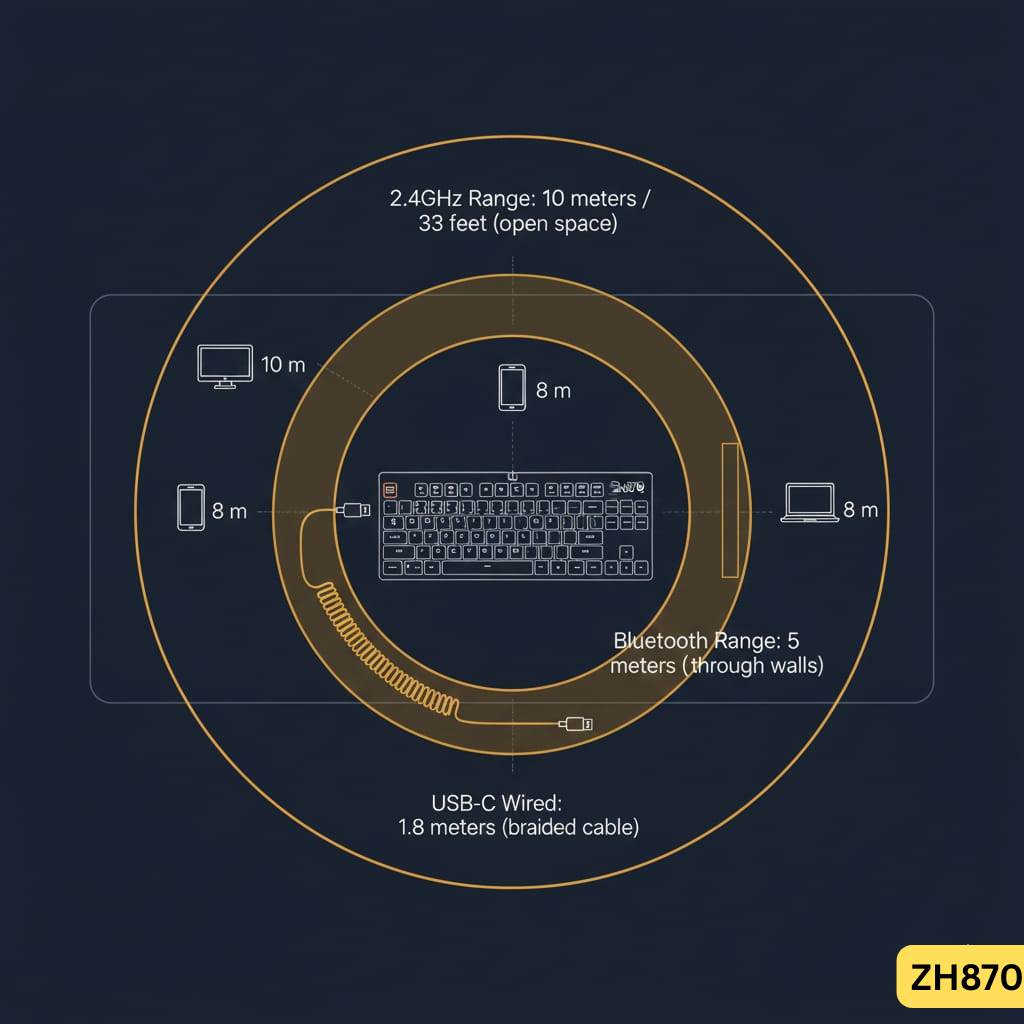
2.4GHz Wireless: Gaming Performance
Latency: User reports indicate near-zero latency in 2.4GHz mode for casual gaming. However, no independent lab testing exists to confirm polling rates or input lag measurements.
Range: Reliable up to 10 meters (33 feet) in open space; walls and interference reduce this to ~5 meters.
Gaming verdict: Adequate for casual FPS/MOBA but lacks Hall effect switches and rapid trigger for competitive esports.
For wireless gaming keyboards, compare the Corsair K63 wireless TKL or Logitech K800 wireless.
Bluetooth 5.0: Multi-Device Productivity
Supports up to 5 devices with quick switching via Fn + 1/2/3/4/5. Pairing is straightforward, and macOS automatically detects keyboard layout (Command/Option keys work correctly without remapping).
Switching delay: 2-3 seconds to swap devices, which interrupts active typing — annoying for users who frequently switch between laptop and desktop.
USB-C Wired: Zero Latency
Plug-and-play with instant recognition on Windows, macOS, and PS5. The 1.8m braided cable is long enough for most desk setups but not detachable.

Alt text: Diagram showing ZH870 tri-mode connectivity options – Bluetooth, 2.4GHz wireless, and USB-C wired
ZH870 Hot-Swap Switches: Customization Freedom
Stock Switch Options
Gateron Brown (Standard):
- Type: Tactile
- Actuation: 1.8mm | Total travel: 4mm
- Feel: Light tactile bump, quiet enough for office use
- Best for: Hybrid typing/gaming
Gateron Yellow (Optional):
- Type: Linear
- Feel: Smooth, no tactile bump, “buttery” keystrokes
- Best for: Pure typists who want silent operation
Sakura/Sea Sand (Marketing Names):
- Proprietary switches with undisclosed manufacturer
- Marketed as “silent” but users report a “ceramic-like click” — dampened, not truly silent
Modding Potential
Compatible with all 3-pin and 5-pin switches:
- Cherry MX (Red, Brown, Blue, Black)
- Gateron (Milky, Ink, Oil King)
- Kailh (Box, Speed, Pro)
- Custom linears (Alpaca, Banana Split, Tangerine)
No soldering required — simply pull stock switches with the included tool and snap in replacements. This makes the ZH870 keyboard an excellent beginner board for experimenting with different switch types.

Alt text: ZH870 hot-swappable PCB with switch removed showing 5-pin socket compatibility
ZH870 Keyboard Battery Life & Common Battery Problems
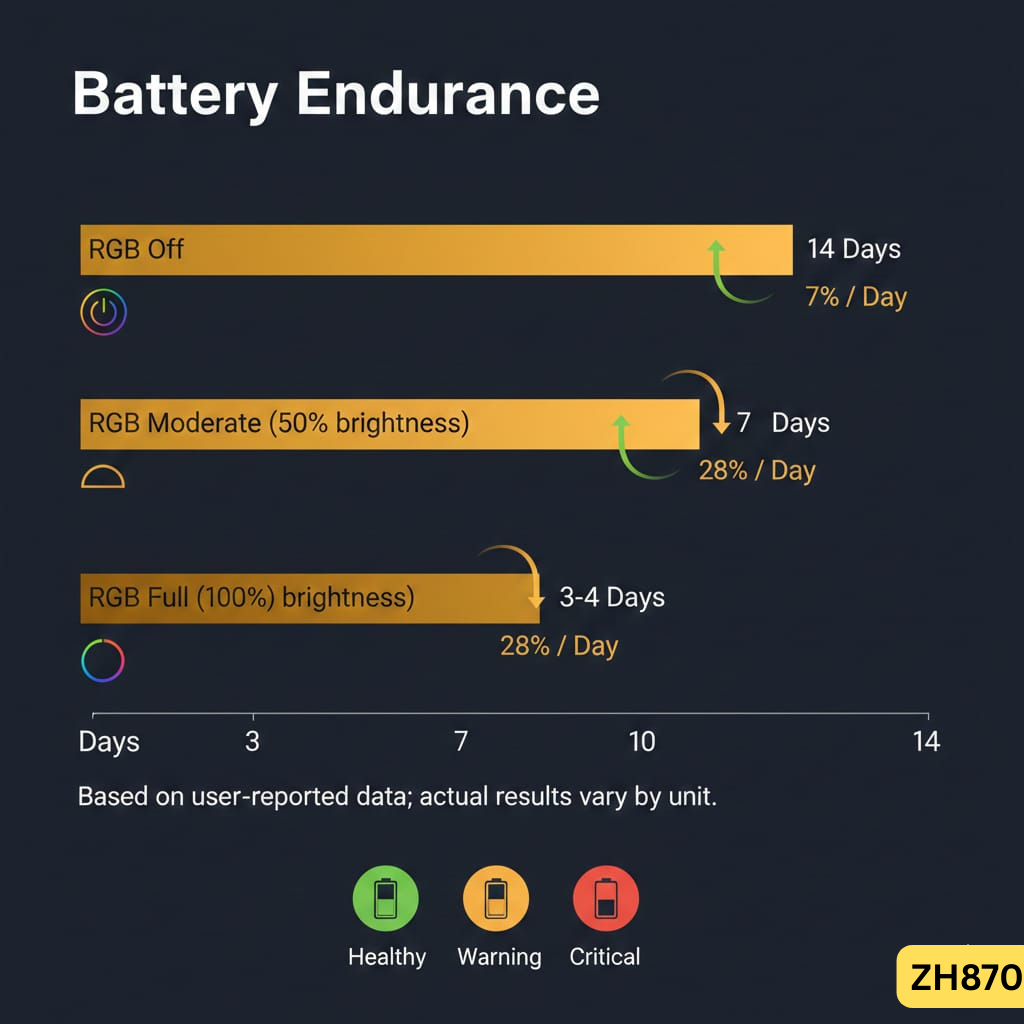
Advertised: 4000mAh Capacity
Zornher claims the 4000mAh battery provides weeks of wireless use with RGB disabled and several days with moderate RGB usage.
Reality: Inconsistent Performance
Amazon reviews reveal a pattern of battery issues:
- “Drains quickly despite showing full charge — requires constant plugging” (7% of 1-star reviews)
- “Battery wouldn’t charge properly, got a dud unit” (isolated QC failures)
- “Lasts 3-4 days with RGB on, about 1 week with RGB off” (positive experiences)
Charging indicator:
- Blue light (solid): Charging
- Green light: Fully charged
- Red flashing (ESC key): Low battery warning
Verdict: Battery performance varies by unit. Some users report excellent endurance, while others experience rapid drain. This inconsistency suggests QC issues that should be reported within the return window.
For reliable wireless keyboards, see our Logitech K750 solar keyboard or Logitech K800 rechargeable reviews.
Zornher ZH870 Keyboard Software, Drivers & RGB Issues
The Problem: Hard to Find, Poorly Documented
Unlike established brands (Logitech, Razer, Corsair) with robust software ecosystems, Zornher provides minimal driver support. Users report:
❌ No clear download link on the official website
❌ Confusion between “Zornher software” and generic “Bootmapper” tools
❌ Limited functionality (basic RGB control, macro recording)
❌ No VIA/QMK support for advanced customization
Workaround: Reddit users suggest searching “Zornher driver ZH870” + model number to find third-party mirrors, but this raises security concerns.
Who this matters for:
- ❌ Power users needing per-key RGB, layers, or complex macros
- ✅ Casual users satisfied with preset RGB modes and standard key mappings
ZH870 Gaming Performance: Casual Yes, Competitive No
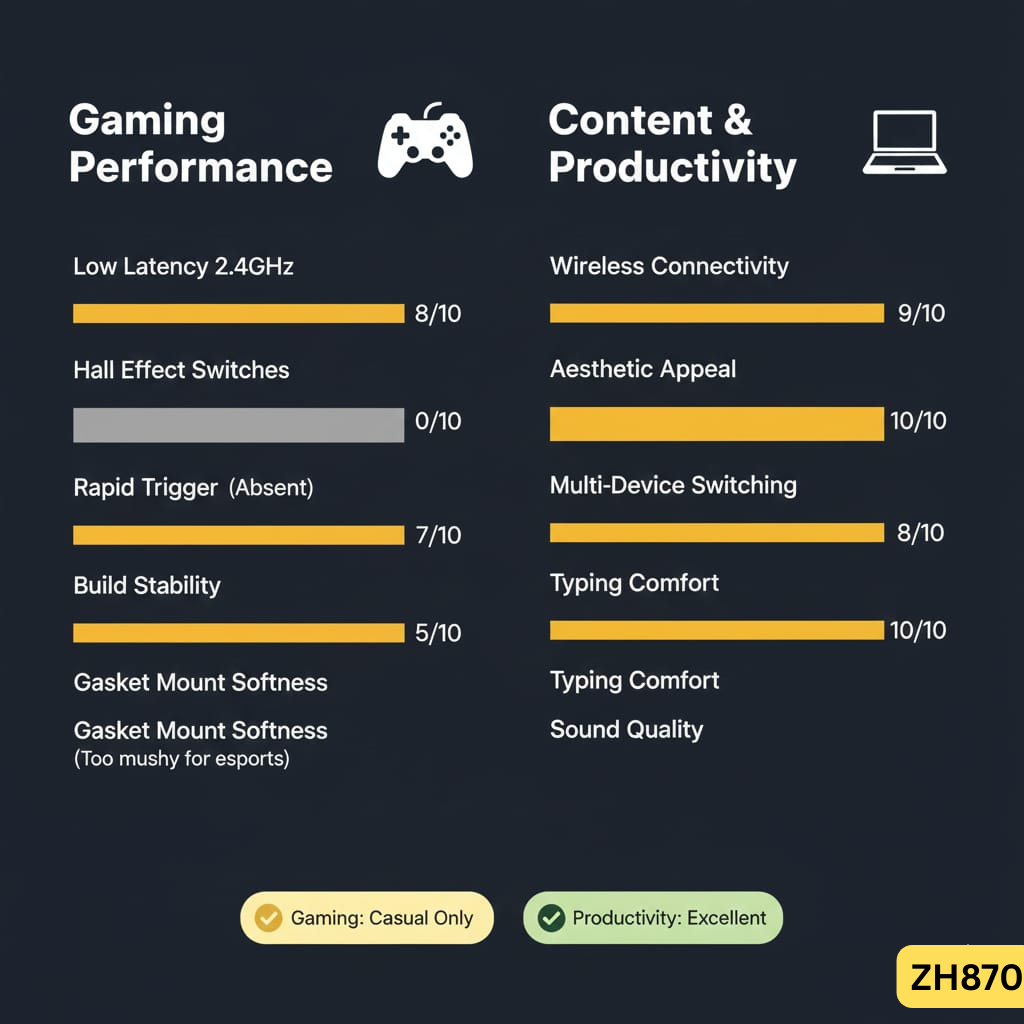
The ZH870 excels for casual gaming and content creation but lacks competitive esports features—ideal for streamers and productivity users, not ranked Valorant grinders.
What the ZH870 Keyboard Does Well
✅ Low latency in 2.4GHz mode — responsive enough for League, Valorant, Fortnite at casual ranks
✅ Hot-swap allows gaming switch upgrades (install Kailh Speed Silver for faster actuation)
✅ Stable wireless connection — no disconnects or stuttering reported
Where It Falls Short
❌ No Hall effect switches — can’t achieve 0.1mm actuation for competitive advantage
❌ No rapid trigger — lacks dynamic key reset for faster inputs
❌ Gasket mount feels “mushy” — competitive players prefer stiffer platforms for precise control
Reddit consensus: “Most ‘gaming’ keyboards are a scam. The ZH870 is just fine for gaming unless you’re a professional esports player.”
Gaming keyboard alternatives: Compare with the Logitech G213 membrane keyboard, Corsair K55 RGB, Corsair K65 compact mechanical, or Corsair K100 flagship for different gaming options.

Alt text: ZH870 keyboard in gaming setup with RGB lighting and gaming mouse
ZH870 Keyboard Pros and Cons: The Complete Breakdown
✅ What the ZH870 Does Right
| Strength | Why It Matters |
|---|---|
| Creamy sound out of box | No need for modding lubing, foam, or stabilizers |
| Stunning keycap aesthetics | Topographic, ZH870 keyboard spider web designs are TikTok-worthy |
| Tri-mode connectivity | Versatile for laptop, desktop, console users |
| Hot-swap switches | Easy customization without soldering |
| Gasket mount | Softer, more comfortable typing experience |
| Value at $90-100 | Feature set rivals Keychron K series at this price |
| PBT keycaps | Resist shine and oil buildup vs. ABS |
❌ Where the ZH870 Disappoints
| Weakness | Impact | Severity |
|---|---|---|
| Plastic enclosure | Feels budget compared to metal alternatives | Moderate |
| Battery drain issues | Some units require frequent charging | High (QC inconsistency) |
| RGB stuck on certain modes | Underglow/ESC key color bugs | Moderate |
| Poor software support | Hard to find drivers, limited customization | Moderate |
| No VIA/QMK | Can’t remap keys or create custom layers easily | Low (casual users) |
| Suspected rebrand | Likely Aula F99 Pro clone; ethical concerns | Low (functional) |
| Overpriced at $130+ | Better alternatives (ND75, Keychron) exist | High |
Who Should Buy the ZH870 Keyboard (And Who Should Avoid It)
Buy the Zornher ZH870 Keyboard If
✅ You want a visually striking mechanical keyboard with creamy sound
✅ Wireless connectivity and hot-swap switches matter for casual gaming or productivity
✅ You’re a content creator needing aesthetic setup photos
✅ You can find it at $90-100 (excellent value)
✅ You’re a beginner exploring mechanical keyboards
Avoid the ZH870 Keyboard If
❌ You want a full metal case (see Corsair K63 or K65)
❌ Competitive gaming features like Hall effect switches are critical (Corsair K95 or K100)
❌ Advanced software customization (VIA/QMK) is required
❌ You’re paying $130+ — better alternatives exist
ZH870 vs. Alternatives: What Should You Buy Instead?
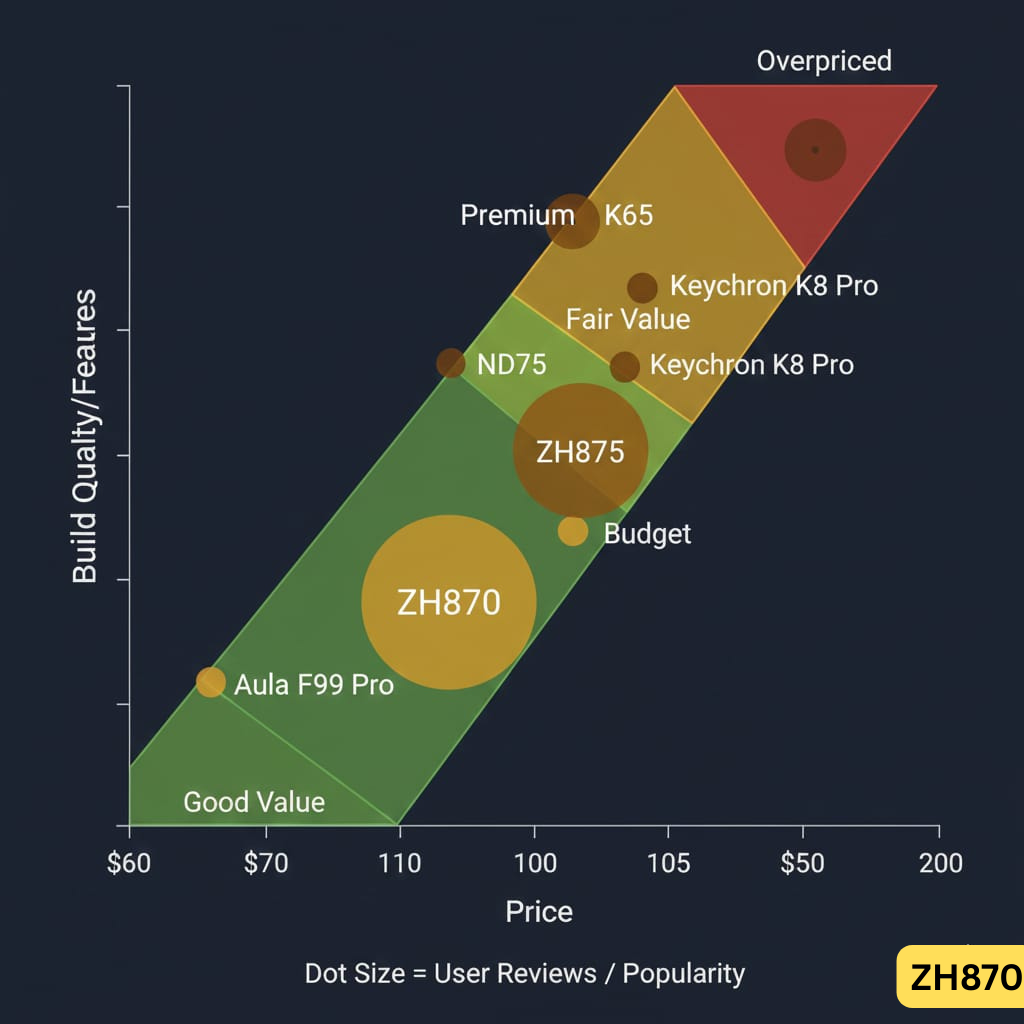
Direct Comparison Table
| Keyboard | ZH870 Keyboard Price | Build | Connectivity | Key Advantage | Best For |
|---|---|---|---|---|---|
| ZH870 | $90-135 | Plastic + Al plate | Tri-mode | Aesthetics, sound | Content creators, first-timers |
| Aula F99 Pro | $60-80 | Plastic + Al plate | Tri-mode | Same as ZH870, cheaper | Budget shoppers (AliExpress) |
| ND75 | $100-120 | Full metal | Tri-mode | LCD screen, premium build | Build quality priority |
| Keychron K8 Pro | $110 | Plastic/Al | Tri-mode | VIA/QMK, established brand | Customization enthusiasts |
| Keychron Q2 | $169 | Full metal | Wired only | CNC machined, premium | Top-tier enthusiasts |
| Logitech G413 | $70-90 | Aluminum top | Wired only | Romer-G, gaming | Logitech ecosystem |
| Corsair K63 | $80-100 | Plastic | Wireless/wired | Compact TKL, gaming | FPS/esports |
When to Choose ZH870
Buy the ZH870 if:
- You prioritize aesthetic keycaps (topographic, spider web designs)
- You want great sound without modding
- You need tri-mode connectivity for under $100
- You’re a beginner exploring mechanical keyboards
Skip it for:
- ND75 → If you want metal housing and an LCD screen ($20 more)
- Keychron K8 Pro → If you need VIA/QMK firmware customization
- Aula F99 Pro → If you want the same keyboard for $30-50 less (likely the OEM source)
- Logitech G413 → If you prefer aluminum construction
- Corsair K65 → For gaming brand reliability

Alt text: Side-by-side comparison of ZH870, Aula F99 Pro, ND75, and Keychron K8 Pro keyboards
Is the Zornher ZH870 Keyboard Legit or a Scam?
Reddit’s Investigation
When the ZH870 first went viral in early 2024, r/keyboards and r/MechanicalKeyboards erupted with skepticism:
- “Have you ever heard of this keyboard?”
- “No reviews anywhere — is this a dropshipping scam?”
- “Looks exactly like the Aula F99 Pro”
The Verdict: Legitimate Seller, Likely Rebrand
Evidence for legitimacy:
✅ Multiple confirmed deliveries across Reddit, Amazon, regional resellers
✅ 2-year warranty offered on official site
✅ Responsive customer service (refunds for defective units)
✅ No widespread reports of non-delivery or fraud
Evidence for rebrand concerns:
⚠️ Strong visual and spec resemblance to Aula F99 Pro
⚠️ Limited company history and vague manufacturing details
⚠️ Heavy TikTok influencer marketing with few independent reviews
⚠️ Price premium ($90 vs. $60 for Aula F99 Pro on AliExpress)
Bottom line: Zornher is not a scam — you will receive a functional ZH870 keyboard. However, you’re likely buying a white-labeled Chinese OEM board with custom keycaps and marketing, not an original design.
ZH870 Customer Reviews: What Real Users Are Saying
Amazon Rating Breakdown (4.7/5 Stars, 77 Reviews)
| Rating | Percentage | Common Themes |
|---|---|---|
| 5-star ⭐⭐⭐⭐⭐ | 87% | Sound quality, aesthetics, value, typing comfort |
| 4-star ⭐⭐⭐⭐ | 6% | Good keyboard, minor RGB issues |
| 3-star ⭐⭐⭐ | 4% | Side-printed legends, no numpad confusion, RGB stuck |
| 2-star ⭐⭐ | 0% | No reviews |
| 1-star ⭐ | 3% | Battery defects, RGB stuck |
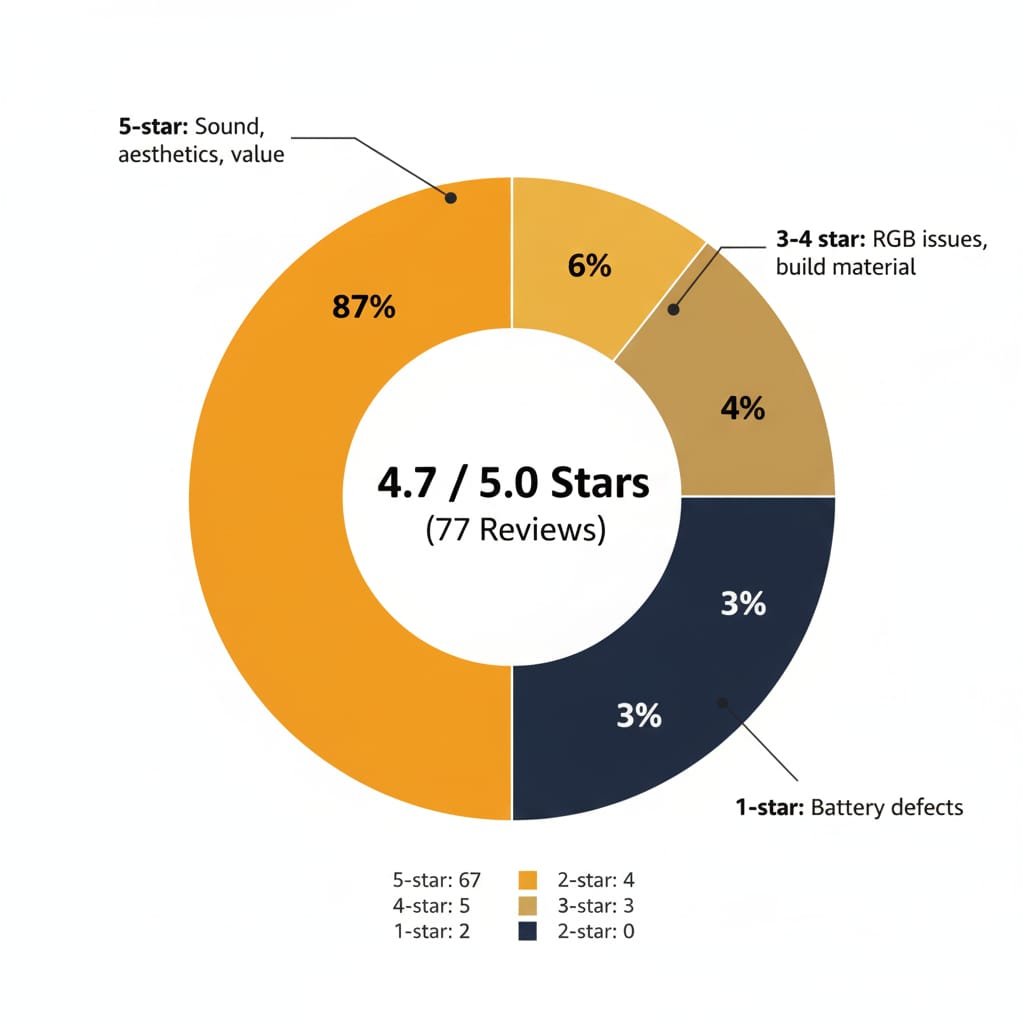
Real Amazon Reviews (Verified Purchases)
5-Star: “BEST KEYBOARD OF ALL TIME !!!” — Kane william (August 2025)
“Absolutely spectacular just as shown in the videos it’s weight is perfect the color is perfect the keycap quality is amazing size is just how i wanted it to be don’t even get me started on the sound.. it’s so great i don’t even know how to describe it and all for only 90$. deal of a lifetime BUY THIS KEYBOARD!”
Verified Purchase: White Topographic variant
5-Star (Updated): Battery Issue → Excellent Customer Service — Ethan Silva (September 2025)
“The keyboard works technically and looks pretty dang cool. It is bright and feels good to type it. The quality of the board feels topnotch. But I have one huge glaring issue: It does not hold a charge at all. I’ll plug it in to the PC and the software says it is 100% charged but as soon as you unplug it, it will drop to 5%… I purchased two of these boards and one of them does not have this problem at all, which leads me to believe it is a quality issue.”
UPDATE:
“ZORNHER Troubleshot the faulty board with me diligently for a day or two before coming to the same conclusion I did; The battery was a dud. They offered me a full refund. Fantastic customer service. The other board is working great and has some serious style. Just make sure to know your homekeys!”
Verified Purchase: White Topographic variant
4-Star: “ESC KEY RGB bug?” — Don Nguyen (December 2025)
“Keyboard is fantastic only reason why its a 4 star is because i first purchased it the ESC key LED is pure blue apparently its a known issue with this keyboard. i returned it amazon sent me a replacement with still the same issue… i dont wanna even bother trying to get another one if its going to be the same thing. other than that sounds creamy and looks amazing hopefully if u buy this u dont have the same issue i have”
Verified Purchase
3-Star: “Rgb is finicky” — Timothy Lyles (December 2025)
“Underglow rgb is non-configurable and stuck on rainbow setting. Also the ‘Escape’ key is stuck green and will not change color. Besides for poor functioning rgb it works good.”
Verified Purchase: Lightning variant
Key Takeaways from Real Users
What Users Love:
✅ Sound quality — “creamy,” “sounds nice,” “don’t even get me started on the sound”
✅ Aesthetics — “fire,” “pretty dang cool,” “has some serious style”
✅ Value at $90 — “deal of a lifetime,” “quality is good for the price”
✅ Customer service — “Fantastic,” “offered full refund,” responsive troubleshooting
✅ Build feel — “topnotch,” “weighty,” “sturdy,” “firm and click”
Confirmed Issues:
❌ ESC key RGB bug — “known issue,” stuck on blue or green (multiple reports)
❌ Underglow stuck on rainbow — non-configurable (confirmed)
❌ Battery QC — some units drop to 5% immediately after unplugging
❌ Side-printed legends — “awkward,” “difficult to see”
❌ Poor instructions — driver download unclear
Reliability Note: Battery issues appear to affect a minority of units (QC inconsistency), but customer service provides full refunds when they occur.
ZH870 Keyboard Price Guide: Where to Buy & What to Avoid
Official Purchase Channels
1. Zornher Official Website
- Pros: Full warranty, all variant options
- Cons: 2-4 week shipping from China
- Link: zornher.com/collections/80-mechanical-keyboard
2. Amazon (Recommended)
- Pros: Fast Prime shipping, easy returns, buyer protection
- Cons: Limited variant availability
- ZH870 Keyboard Price: $89.99-$139.99 depending on keycap design
- ASINs:
- B0DS1TNNGN (Black Custom)
- B0DS1SV3R1 (ZH870 Keyboard Spiderweb)
- B0F23L9B65 (Topographic)
3. Regional Resellers
- Shopee, Noon, FMSI (for India, Middle East, Southeast Asia)
- ZH870 Keyboard Price varies ($100-160 USD equivalent)
ZH870 Keyboard Price: What to Pay
| Price Range | Verdict |
|---|---|
| $60-80 | Excellent value (sale/coupon pricing) — BUY |
| $90-100 | Fair value — CONSIDER if aesthetics matter |
| $110-130 | Overpriced — WAIT for sale or buy ND75/Keychron instead |
| $135+ | TikTok tax — AVOID |
Red Flags to Watch For
❌ Listings significantly below $60 (likely counterfeit or scam)
❌ Sellers with no reviews or new accounts
❌ “Limited time” pressure tactics on unknown sites
ZH870 Setup Guide: Getting Started
Initial Pairing
2.4GHz Wireless:
- Insert USB receiver into computer
- Turn on keyboard (switch on back)
- Press Fn + W — LED flashes blue
- Connection auto-establishes within 5 seconds
Bluetooth:
- Press Fn + B (or 1/2/3/4/5 for device slots)
- LED flashes rapidly
- Search for “ZH870” or “Zornher Keyboard” in Bluetooth settings
- Pair (no PIN required)
USB-C Wired:
- Plug in cable — instant recognition, no setup needed
Mode Switching
- Fn + B: Bluetooth mode
- Fn + W: 2.4GHz wireless mode
- Fn + R: Wired mode (cable must be connected)
Warning: Switching takes 2-3 seconds and interrupts typing.
RGB Controls
- Fn + ↑/↓: Brightness adjustment
- Fn + ←/→: Cycle through 22 preset modes
- Fn + PgUp/PgDn: Speed adjustment for animated effects
ZH870 Maintenance & Troubleshooting
Common Issues & Fixes
Problem: Battery Drains Quickly
- Check: ESC key flashing red = low battery
- Fix 1: Fully charge (blue→green LED), then test discharge rate
- Fix 2: Disable RGB (Fn + ↓ until off) to extend battery 3-5x
- Fix 3: If drains in <24 hours with RGB off, contact support for replacement
Problem: RGB Stuck on Certain Colors
- ESC key stuck blue/green: Known firmware bug, no user fix
- Underglow stuck on rainbow: Software customization required
- Workaround: Use wired mode and third-party RGB software (untested)
Problem: Keys Not Registering
- Single key: Switch failure — use hot-swap to replace (included puller)
- Multiple keys: Check battery charge, re-pair Bluetooth, or switch to 2.4GHz
Problem: Cannot Find Drivers
- Solution: Join ZH870 user groups on Reddit/Discord for mirror links
- Alternative: Use keyboard with default settings (most users do this)
ZH870 Keyboard Frequently Asked Questions (FAQs)
Is the ZH870 good for gaming?
Yes, for casual gaming. The 2.4GHz wireless mode provides low-latency performance suitable for FPS, MOBA, and RPG games at non-competitive levels. However, the ZH870 keyboard lacks Hall effect switches and rapid trigger, making it inadequate for professional esports where 0.1mm actuation advantages matter. Gaming verdict: Perfectly fine for 99% of gamers; skip if you’re Radiant in Valorant or Global Elite in CS2.
Gaming alternatives: Corsair K65, K95, or K100 series.
Is the ZH870 mechanical or membrane?
100% mechanical. The ZH870 uses genuine mechanical switches (Gateron Brown/Yellow standard, with Sakura/Sea Sand options). It features a hot-swappable PCB, allowing you to replace switches with any Cherry MX-compatible option without soldering.
Can I use the ZH870 with Mac?
Yes. The keyboard automatically detects macOS and remaps Windows key → Command and Alt → Option. Bluetooth and 2.4GHz wireless modes work seamlessly with macOS 12.0+. Wired USB-C connection is also compatible. Mac-specific alternative: See our Apple Magic Keyboard review.
What is the ZH870 keyboard price in 2025?
The ZH870 keyboard price ranges from:
$89.99-$100 on sale (Amazon, official site)
$110-$139.99 at full retail
$60-80 for Aula F99 Pro (likely same keyboard, AliExpress)
Recommendation: Don’t pay more than $100 for the Zornher ZH870 keyboard.
How long does the ZH870 battery last?
3-7 days with RGB on, 1-2 weeks with RGB off (based on user reports). The 4000mAh battery capacity is high for this price range, but some units suffer from rapid drain issues (QC inconsistency). Test battery performance immediately upon receiving the keyboard.
Is the ZH870 a rebrand of the Aula F99 Pro?
Likely, but unconfirmed. The ZH870 shares an identical layout, gasket mount design, and similar spec sheet with the Aula F99 Pro (available on AliExpress for $60-80). The primary difference is keycap aesthetics (ZH870 keyboard spider web designs) and brand marketing. You’re paying a $20-50 premium for Zornher’s viral branding.
Where can I buy the ZH870 keyboard spider web edition?
Amazon (ASIN: B0DS1SV3R1):
Black Spiderweb Variant — $109.99
Zornher Official Store:
IMD Process Variants (Spiderweb, Meteorite) — $89.99-$139.99
Can I customize the RGB lighting on ZH870?
Partially. The ZH870 keyboard has 22 preset RGB modes accessible via Fn shortcuts. Full customization (per-key colors, custom zones) requires installing Zornher’s driver software, which is difficult to find and poorly documented. No VIA/QMK support exists for advanced programming.
Does the ZH870 work with PS5?
Yes, in wired mode. Connect via USB-C cable for plug-and-play functionality. Wireless modes (Bluetooth/2.4GHz) are not supported on PS5 due to Sony’s peripheral restrictions.
What switches does the ZH870 keyboard use?
Stock options:
Gateron Brown (tactile, 1.8mm actuation, 4mm travel) — Standard
Gateron Yellow (linear, smooth, quiet) — Optional
“Sakura” / “Sea Sand” (proprietary linear, marketed as silent) — Optional
All switches are factory-lubed for smoother feel. The ZH870 is hot-swappable, so you can install any 3-pin or 5-pin mechanical switch.
How do I fix ZH870 battery drain issues?
Fully charge until LED turns green (3-4 hours)
Disable RGB (Fn + ↓) to test baseline battery consumption
Switch to 2.4GHz (Bluetooth drains faster)
Monitor for 24 hours — if battery dies in <1 day, contact Zornher support for replacement under warranty
Note: 7% of Amazon reviews report defective batteries; this appears to be a QC issue affecting a minority of units.
Is Zornher a legit company?
Yes, but transparency is limited. Zornher is a real company that ships functional products and honors warranties. However, the brand is relatively new (2024 entry to Western markets) and likely rebrands Chinese OEM keyboards. Multiple users confirm successful purchases, refunds, and customer service interactions.
Final Verdict: Who Should Buy the ZH870 Keyboard?
Recommended For
✅ First mechanical keyboard buyers — Great introduction to hot-swap, gasket mount, tri-mode features
✅ Aesthetic-focused users — Topographic/ZH870 keyboard spider web keycaps are genuinely beautiful
✅ Content creators — Makes stunning setup photos/videos for TikTok, Instagram, YouTube
✅ Budget shoppers ($90-100 price range) — Excellent value for feature set
✅ Casual gamers & productivity users — Versatile for both work and play
Not Recommended For
❌ Competitive esports players — Lacks Hall effect, rapid trigger (see Corsair K65 or K100)
❌ Keyboard enthusiasts — Prefer established brands with proven reliability
❌ Users needing extensive software — Poor driver support, no VIA/QMK
❌ Those uncomfortable with new brands — Limited long-term reliability data
❌ Buyers at $130+ pricing — Better alternatives (ND75, Keychron Q2) exist
The Bottom Line
At $90-100, the Zornher ZH870 keyboard delivers on its viral promises: gorgeous keycaps, satisfying sound, and versatile connectivity in a beginner-friendly package. At $130+, you’re paying a TikTok tax for a likely Aula F99 Pro rebrand with questionable long-term reliability.
Rating: 7.5/10
- Sound: 9/10 (legitimately creamy)
- Aesthetics: 10/10 (viral for a reason)
- Build Quality: 6/10 (plastic feels cheap)
- Value at $90: 9/10 (excellent)
- Value at $135: 4/10 (overpriced)
- Software: 3/10 (poor documentation)
- Reliability: 6/10 (battery QC issues)
Our recommendation: Wait for sales to hit $90-100, buy from Amazon for easy returns, and test the battery immediately. If you want guaranteed quality, spend $20 more on the ND75 or stick with Keychron’s K-series.
Where to Buy the ZH870 Keyboard
Verified Purchase Links
Amazon US (Recommended for Fast Shipping & Easy Returns):
- Black Custom Variant with Shine-Through Keycaps — $99.99 (ASIN: B0DS1TNNGN)
- Black Spiderweb Variant (ZH870 Keyboard Spider) — $109.99 (ASIN: B0DS1SV3R1)
- White Topographic Variant — $119.99 (ASIN: B0F23L9B65)
- Search All ZH870 Variants on Amazon
Zornher Official Store (Ships from China, 2-4 Weeks):
- Main PBT Material Keycap 80% Keyboard — Base model
- IMD Process Variants (Spiderweb, Meteorite) — $89.99-$139.99
- Dye-Sublimation Variants (Starry Night) — Premium designs
- Prism Edition — RGB-focused variant
- Browse All 80% Collection — Complete catalog
Regional Alternatives:
- India: Check Flipkart and local tech resellers
- Middle East: Available on Noon.com
- Southeast Asia: Listed on Shopee
Price Alert Tool: Use CamelCamelCamel to track ZH870 keyboard price drops below $90.
Related Keyboard Reviews & Resources
TKL & Compact Mechanical Keyboards
- Corsair K63 Wireless TKL Review — Wireless gaming alternative
- Corsair K65 Series Review — Compact mechanical gaming keyboards
- Corsair K30 Budget Gaming Keyboard — Entry-level gaming option
Full-Size Gaming Mechanical Keyboards
- Corsair K95 Keyboard Models Review — Full-size with macro keys
- Corsair K100 RGB vs K100 Air Review — Premium flagship keyboards
- Logitech G413 Aluminum Mechanical — Brushed aluminum gaming keyboard
Budget Gaming Keyboards
- Logitech G213 Gaming Keyboard Review — Budget membrane gaming
- Corsair K55 RGB Keyboard Review — Affordable RGB membrane
Wireless & Productivity Keyboards
- Logitech K800 Illuminated Wireless Review — Rechargeable wireless with backlight
- Logitech K750 Solar Keyboard Review — Solar-powered wireless keyboard
- Apple Magic Keyboard 2 Review — Mac-optimized option
- Cherry KW X ULP Wireless Review — Ultra-slim wireless
External References & Community Discussions
- Zornher Official Website — Official manufacturer site
- ZH870 Product Collection — All variants and options
- r/keyboards: “Have you ever heard of this keyboard?” — Initial discovery thread
- r/keyboards: Legitimacy Discussion — Brand verification
- r/keyboards: Gaming Performance — User experience
- YouTube: Honest Review by @peachietech — Unbiased short review
- r/MechanicalKeyboards Wiki — General mechanical keyboard guide
- Switch & Click: Mechanical Keyboard Guide — Beginner’s resource
Legal Disclaimer:
This article aggregates user-reported issues and publicly available information about the Zornher ZH870 Keyboard The content is provided for informational purposes only and does not represent the views or official stance of Zornher or any retailer. We do not claim that the described defects or failures affect all units, nor do we guarantee the accuracy of individual user reports. Readers should verify information independently and consult the manufacturer or authorized service providers for official guidance. This site is not liable for any decisions made based on the content provided herein.