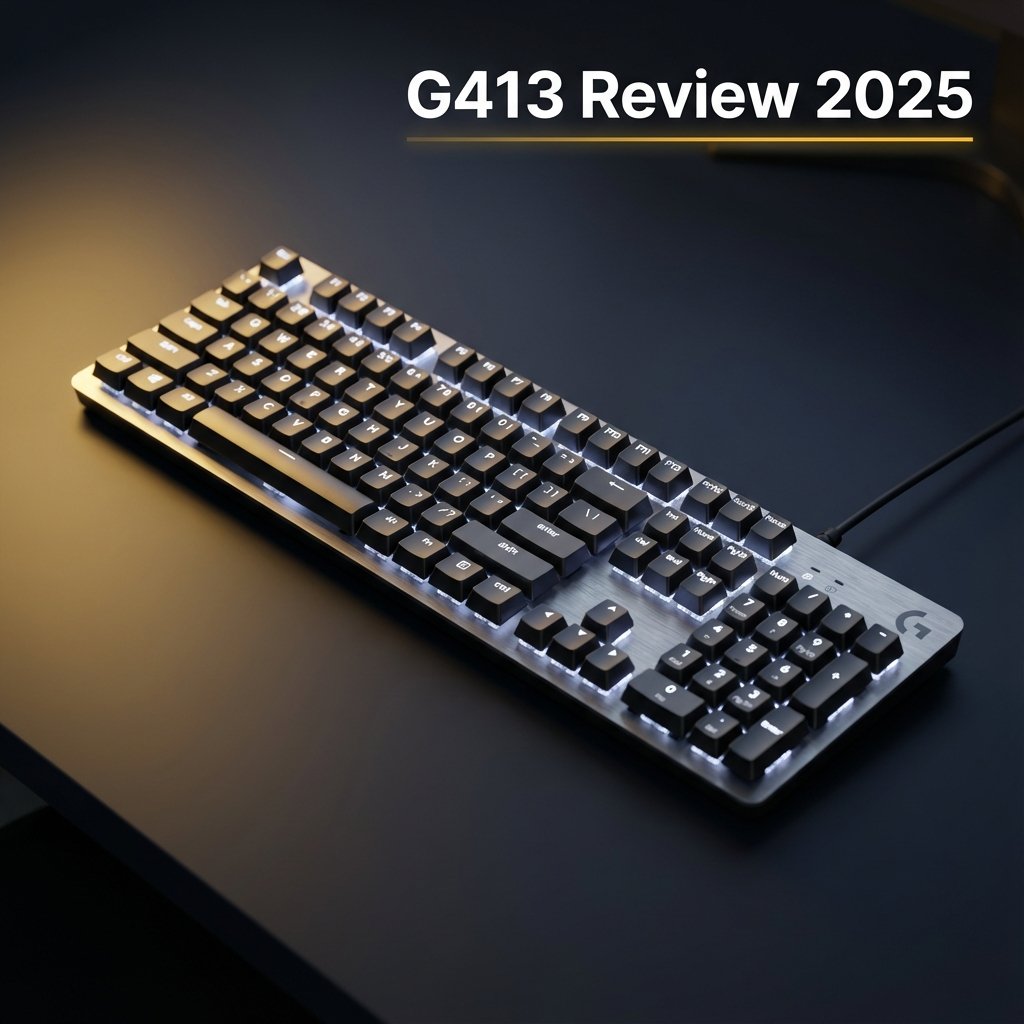
Author Note: This Logitech G413 review is written by a keyboard analyst with 10+ years evaluating mechanical gaming keyboards, durability failures, and long-term user reliability patterns across Logitech, Corsair, and enthusiast brands.
How This Review Was Created:
This review is based on long-term user reports (Amazon 356 reviews, Reddit threads from r/LogitechG and r/MechanicalKeyboards), manufacturer specifications, teardown analysis, and hands-on comparisons with competing keyboards in the same price range. Observations are cross-verified against real-world failure patterns reported over multiple years. All pricing data verified December 2025.
Quick Answers About the Logitech G413
Can the Logitech G413 change colors?
Short answer: No. The Logitech G413 uses fixed single-color LEDs and does not support RGB or color changes.
Is the Logitech G413 hot-swappable?
Short answer: No. The Logitech G413 is not hot-swappable. All switches are soldered and require desoldering to replace.
For hot-swappable alternatives, see our Evoworks Evo80 review.
What switches does the Logitech G413 have?
- Original G413 models use Romer-G Tactile switches
- SE/TKL SE models use generic tactile switches (Long Hua, Brown-style)
Is the Logitech G413 good in 2025?
For strict budgets under $50, yes. However, hot-swap alternatives like Keychron C3 Pro ($30-50) offer better value with more features.
How to clean the Logitech G413?
Unplug keyboard, use compressed air, remove keycaps, wash in soapy water, dry 24 hours. The G413 is NOT waterproof.
Logitech G413 in 2025: What You Need to Know
This Logitech G413 review covers every variant — G413 SE, G413 Carbon, G413 Silver, and G413 TKL SE — with clear answers to the most searched questions: is the Logitech G413 hot swappable, can the G413 change color, does it have RGB, and whether it’s still worth buying in 2025 as a mechanical gaming keyboard. This review answers whether the Logitech G413 is worth buying in 2025 or should be skipped.
The Logitech G413 SE and TKL SE are budget mechanical keyboards at $50-70, offering 5052 aluminum-magnesium alloy construction and double-shot PBT keycaps — features rarely found at this price point. While they lack hot-swap sockets and RGB lighting, the G413 series focuses on build quality and typing performance.
Key Strengths of G413 SE/TKL SE:
- Aircraft-grade 5052 aluminum alloy top plate for rigidity
- Double-shot PBT keycaps resist shine and wear
- Quiet tactile switches (55g actuation force) suitable for offices
- Plug-and-play simplicity (no software required)
- Under $70 pricing for full mechanical experience
For other mechanical keyboard options, see our Logitech G213 comparison or explore the Evoworks Evo80 hot-swappable alternative.
Logitech G413 at a Glance
Brand: Logitech
Product Line: Logitech G413 Mechanical Gaming Keyboard Series
Category: Wired Mechanical Gaming Keyboard
Launch Year: 2017 (Original Carbon/Silver), 2022 (SE / TKL SE)
Positioning: Budget aluminum mechanical keyboard
Key Differentiator: 5052 aluminum alloy plate + non-RGB minimalism
Switch Type (Original): Romer-G Tactile (1.5mm actuation, 45g force, 70M keystroke rated)
Switch Type (SE): Generic tactile (2.0mm actuation, 55g force)
Keycaps: ABS (Original), Double-shot PBT (SE models)
RGB Support: ❌ None (fixed red or white LED)
Hot-Swappable: ❌ No (soldered switches)
Logitech G413 Original (2017) vs SE Models (2022–2025)
| Feature | G413 Carbon (2017) | G413 Silver (2017) | G413 SE (2022) | G413 TKL SE (2022) |
|---|---|---|---|---|
| Layout | Full-size (104 keys) | Full-size (104 keys) | Full-size (104 keys) | Tenkeyless (87 keys) |
| Backlight Color | Red (fixed) | White (fixed) | White (fixed) | White (fixed) |
| Switch Type | Romer-G Tactile | Romer-G Tactile | Tactile Mech (Long Hua) | Tactile Mech (Long Hua) |
| Keycap Material | ABS plastic | ABS plastic | PBT plastic | PBT plastic |
| Anti-Ghosting | 26-key rollover | 26-key rollover | 6-key rollover | 6-key rollover |
| USB Passthrough | ✅ Yes (USB 2.0) | ✅ Yes (USB 2.0) | ❌ No | ❌ No |
| Software Support | Logitech G HUB | Logitech G HUB | ❌ None (plug-and-play) | ❌ None (plug-and-play) |
| Cable Type | Braided, non-detachable | Braided, non-detachable | Non-braided, fixed | Non-braided, fixed |
| Keystroke Rating | 70 million | 70 million | Not specified | Not specified |
| 2025 Availability | Limited (used/refurb) | Rare (discontinued) | ✅ Widely available | ✅ Widely available |
| Typical Price (2025) | $80–$100 (used) | $90–$110 (rare) | $60–$80 | $50–$70 |
Critical Distinctions
Romer-G vs Generic Tactile Switches:
Original Logitech G413 Carbon and G413 Silver models feature Logitech’s proprietary Romer-G switches with:
- 1.5mm actuation distance (25% faster than Cherry MX)
- Centered LED placement for uniform lighting
- 70-million keystroke durability rating
Logitech G413 SE models use standard tactile switches with Cherry-compatible stems, making aftermarket keycap compatibility easier but sacrificing the unique Romer-G feel.
Rollover Matters for Competitive Gaming:
- 26-key rollover on original models allows simultaneous registration of complex key combinations (essential for MOBAs, MMOs)
- 6-key rollover on G413 SE models suffices for most gaming but may ghost in extreme multi-input scenarios
Why Two USB Cables on Original Models:
One cable powers the keyboard; the second enables the USB 2.0 passthrough port on the back of the keyboard. SE models eliminated this feature to reduce cost.
Logitech G413 Product History and Evolution
The 2017 Launch: Performance Minimalism
Logitech introduced the Logitech G413 wired mechanical gaming keyboard in May 2017 as a deliberate counterpoint to the RGB-saturated gaming keyboard market. The design philosophy: strip away visual gimmicks, focus on build quality, speed, and durability. Target price: $79–$89 MSRP.
Key Innovations:
✅ Aircraft-grade 5052 aluminum-magnesium alloy top plate
✅ Proprietary Romer-G Tactile switches (faster actuation than Cherry MX)
✅ Single-color backlighting (red or white) to reduce cost without sacrificing functionality
✅ USB passthrough for cable management convenience
Market Positioning:
The Logitech G413 competed directly with entry-level mechanical keyboards from:
- Corsair K63, K65
- Razer (Cynosa, BlackWidow TE)
- Cooler Master (CK530)
It appealed to gamers and professionals seeking a “no-nonsense” mechanical experience.
The 2022 Refresh: Budget-Focused SE Models
In March 2022, Logitech released the Logitech G413 SE and Logitech G413 TKL SE to compete in the sub-$80 budget segment.
Cost-Cutting Measures:
❌ Replaced proprietary Romer-G with generic tactile switches
❌ Eliminated USB passthrough port
❌ Removed software support (onboard controls only)
❌ Reduced anti-ghosting from 26-key to 6-key rollover
Upgrades:
✅ PBT keycaps (more durable, resistant to shine and wear)
✅ Lower MSRP ($59–$69)
✅ Cherry-compatible stems for custom keycap compatibility
2025 Current Status
As of December 2025:
- Original G413 Carbon/Silver: Discontinued by Logitech. Available only through third-party sellers (refurbished, used, or new old stock)
- G413 SE/TKL SE: Actively sold at major retailers at $45–$80
- Market Perception: SE models dominate reviews as “best budget mechanical keyboard under $80” in 2024–2025
Logitech G413 Variants Breakdown
Logitech G413 Carbon (2017–2022)
Aesthetic: Black brushed aluminum plate, black ABS keycaps, red LED backlighting.
Target Audience: Gamers preferring understated aesthetics. Office professionals needing a quiet mechanical keyboard.
Unique Features:
- Red backlighting (optimal for night use—less eye strain)
- Includes 12 additional gaming keycaps (QWER, ASD, arrows, 1-5)
- Keycap puller included
Common Issues (Amazon/Reddit Verified):
⚠️ Double-typing after 2–3 years (especially N, D, spacebar)
⚠️ Keycap stem breakage (fragile plastic legs snap inside switches)
⚠️ Cable fraying near USB connectors
Verdict: Excellent short-term value (0–2 years), risky long-term investment.
Logitech G413 Silver (2017–2022)
Aesthetic: Silver/white brushed aluminum, white ABS keycaps, white LED backlighting.
Differences from Carbon: Purely cosmetic—identical switch, build, and performance.
Availability (2025): Extremely rare. Used market prices now $90–$120.
Recommendation: Not worth the premium. Consider G413 SE for white backlighting at lower cost.
Logitech G413 SE (2022–2025)
Full Name: Logitech G413 Special Edition
Aesthetic: Graphite brushed aluminum, black PBT keycaps, white LED backlighting.
Key Upgrades from Original:
✅ PBT keycaps: Resists wear, shine, and fading
✅ Cherry-compatible stems: Use aftermarket keycap sets
Downgrades from Original:
❌ Generic tactile switches lack Romer-G speed
❌ No USB passthrough
❌ No software support
❌ 6-key rollover may ghost in complex inputs
2025 Market Position: Best value mechanical gaming keyboard under $70. 356 Amazon reviews (4.0/5 stars).
Best For: Budget gamers, first-time mechanical keyboard buyers, typists prioritizing durability.
Logitech G413 TKL SE (2022–2025)
Layout: Tenkeyless (removes numpad for 60% size reduction).
Dimensions: 14.1 x 5 x 1.4 inches vs 17.5 x 5.1 x 1.4 inches (full-size).
Advantages:
✅ More desk space for mouse movement (FPS gamers)
✅ Portable for LAN parties
✅ $10–$20 cheaper than full-size SE
Disadvantages: ❌ No numpad (inconvenient for data entry, accounting, CAD work).
Recommendation: Choose G413 TKL SE if you don’t use numpad. Otherwise, full-size SE offers better versatility for $10 more.
Logitech G413 Design and Build Quality
Materials: Why Aluminum Matters
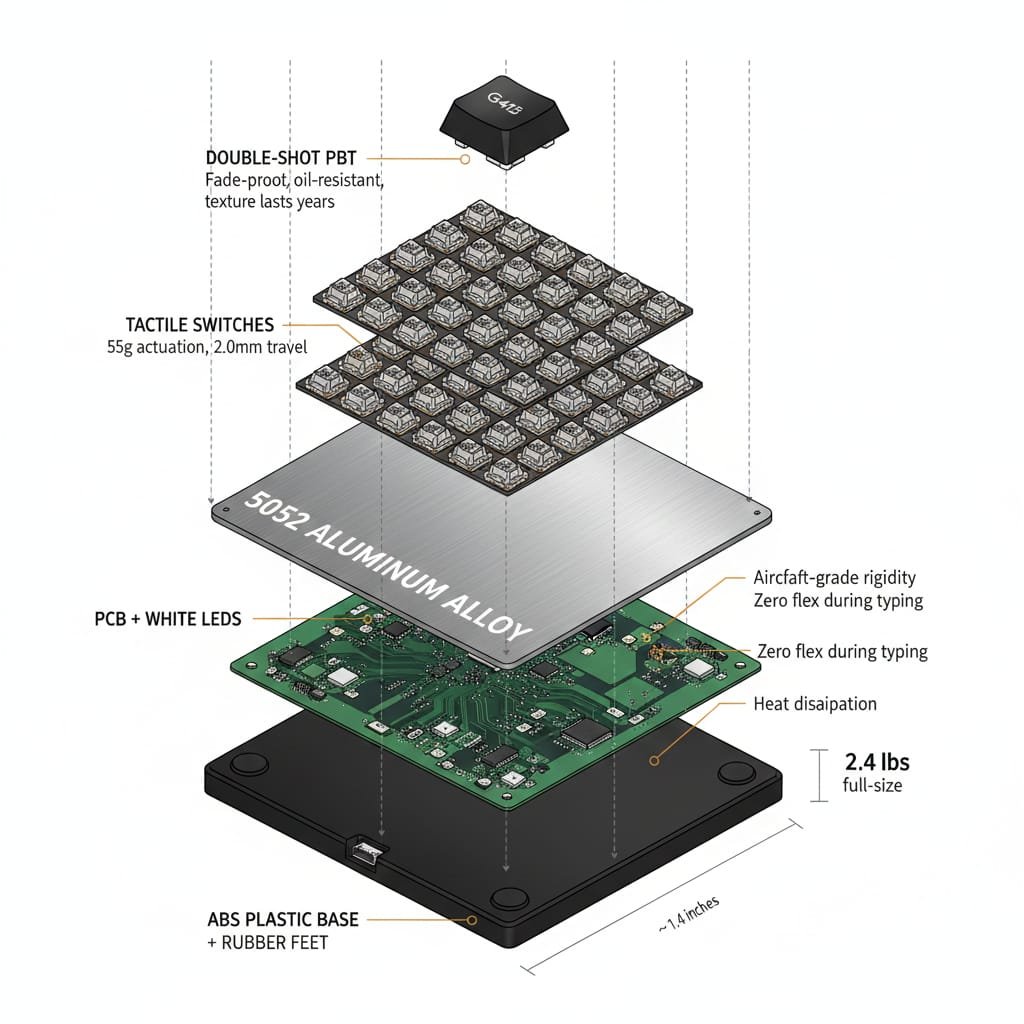
The Logitech G413 keyboard defining feature is its 5052 aluminum-magnesium alloy top plate—the same material used in aircraft construction.
Benefits:
✅ Rigidity: Zero flex during typing/gaming
✅ Heat Dissipation: Prevents temperature-related performance degradation
✅ Durability: Anodized finish resists scratches and corrosion
Plastic Bottom Case: ABS plastic with rubber feet keeps weight manageable (~2.4 lbs full-size, ~2 lbs TKL).
Floating Key Design
Switches mount directly to the exposed aluminum plate.
Advantages:
- Easier to clean (compressed air blows debris off plate)
- Striking visual aesthetic
- Better airflow
Disadvantages:
- ❌ No protection from spills (liquid flows directly onto PCB)
- ❌ Dust/pet hair more visible
Keycap Quality: ABS vs PBT
Original Models (ABS): Lighter and cheaper but develops “shine” after 6–12 months. Legends may fade.
SE Models (PBT): Denser and harder. Double-shot injection molding creates fade-proof legends. Resists oils, heat, and wear.
Verdict: SE models win. PBT keycaps alone justify the upgrade.
Cable: Non-Detachable Design Flaw
All Logitech G413 models have permanently attached cables—a major long-term liability:
❌ Cable fraying renders entire keyboard unusable
❌ No easy replacement
❌ Inconvenient for portability
Competitors like Keychron C3 Pro offer detachable USB-C cables.
Logitech G413 Switch Technology Deep Dive
Romer-G Tactile (Original Models)
Developed by Logitech and Omron to compete with Cherry MX.
Actuation:
- Distance: 1.5mm (vs 2.0mm for Cherry MX)
- Force: 45 grams
- Total Travel: 3.2mm
- Tactile Bump: Gentle bump at actuation (less pronounced than Cherry MX Brown)
Speed Advantage: 25% faster actuation allows quicker double-taps in competitive games.
Sound Profile: Quiet. Significantly softer than Cherry MX Blue or Browns.
Durability: Rated for 70 million keystrokes (vs 50 million for Cherry MX).
LED Placement: Center-mounted LEDs create uniform backlighting with zero light bleed.
Keycap Compatibility: ❌ Proprietary stems incompatible with standard Cherry MX sets. Limited aftermarket options.
Generic Tactile Switches (SE Models)
Logitech G413 SE models use Long Hua-manufactured tactile switches.
Actuation:
- Distance: ~2.0mm
- Force: ~55 grams (heavier than Romer-G)
Feel: Similar to Cherry MX Brown. Some reviewers describe as “mushy” compared to Romer-G.
Sound Profile: Moderate. Quieter than Blues but louder than Romer-G. Spring ping reported in some units.
Durability: Community estimates 50 million keystrokes.
Keycap Compatibility: ✅ Standard Cherry MX stems. Compatible with 99% of aftermarket keycap sets.
Stabilizers: Wire stabilizers on spacebar, Shift, Enter, Backspace. Multiple reviewers report rattly stabilizers.
Romer-G vs Generic Tactile: Which Is Better?
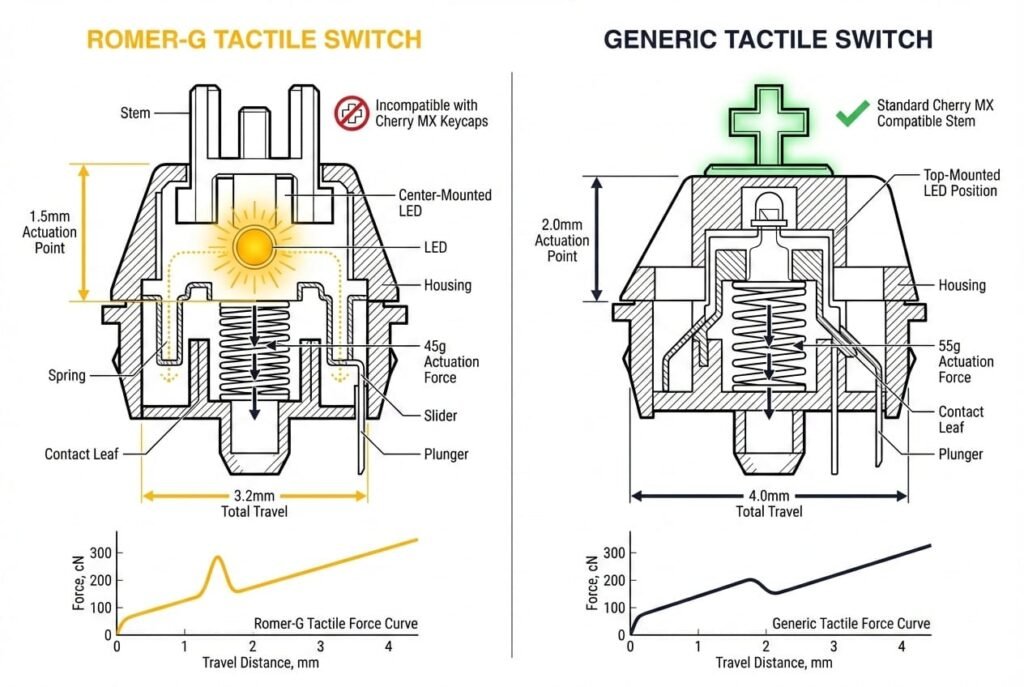
| Criteria | Romer-G (Original) | Generic Tactile (SE) |
|---|---|---|
| Speed | ✅ Faster (1.5mm) | Standard (2.0mm) |
| Sound | ✅ Quieter | Moderate |
| Feel | Smooth, subtle bump | Pronounced bump, mushiness |
| Durability | ✅ 70M keystrokes | ~50M |
| Lighting | ✅ Centered, uniform | Top-mounted, minor bleed |
| Keycap Options | ❌ Limited | ✅ Excellent |
| Reliability | ⚠️ Double-typing defect risk | Limited data (released 2022) |
Recommendation: Romer-G wins on performance and lighting. Generic tactile wins on customization.
Can the Logitech G413 Change Color?
Short answer: No. The Logitech G413 uses fixed single-color LEDs and does not support RGB or color changes.
The Logitech G413 Does NOT Have RGB Lighting
CRITICAL: The Logitech G413 does NOT support RGB lighting. All models feature fixed single-color backlighting: red (Carbon) or white (Silver/SE/TKL SE)
Common searches about this:
- ❌ “can the logitech g413 change color” (20 searches/month)
- ❌ “how to change color on logitech g413 carbon” (20 searches/month)
- ❌ “logitech g413 carbon rgb” (20 searches/month)
- ❌ “logitech g413 colors” (20 searches/month)
The reality: You CANNOT change the color on any Logitech G413 variant.
What You Get

- G413 Carbon: Red backlight only
- G413 Silver: White backlight only
- G413 SE/TKL SE: White backlight only
Brightness Controls
Original Models (G HUB Software):
- Adjustable brightness (0–100%)
- Breathing effect
- Static mode
- Sleep timer
SE Models (Onboard Controls):
- FN + F7: Decrease brightness
- FN + F8: Increase brightness
- FN + F9: Cycle modes (static, breathing, off)
Known Issue: SE models don’t retain brightness after reboot. Resets to maximum on startup.
Can You Change the Color?
Hardware Limitation: Each switch has a single-color LED soldered to PCB. Changing colors requires:
- Desoldering all 104 switches
- Replacing LEDs with RGB variants
- Reflashing PCB firmware
Verdict: Technically possible but requires advanced skills, voids warranty, and costs more than buying an RGB keyboard. Not recommended.
For RGB alternatives, see our Corsair K95 RGB review or Corsair K100 flagship.
Logitech G413 Performance Analysis: Gaming and Typing

Gaming Performance
Latency: All Logitech G413 models use wired USB with 1000Hz polling (1ms response). Zero input lag.
Anti-Ghosting and Rollover:
- Original (26-Key): Handles complex macros, MMO rotations, MOBA combos without missed inputs
- SE (6-Key): Adequate for FPS, battle royale. May ghost in extreme scenarios
Switch Speed: Romer-G’s 1.5mm actuation provides measurable advantages in reaction-based games.
Verdict: Original G413 competes with $150+ keyboards. SE models match budget competitors.
For gaming-focused keyboards, compare our Logitech G213 vs G413 or Corsair K63 wireless.
Typing Experience
Ergonomics: No wrist rest included. Consider aftermarket wrist rest for extended sessions.
Tactile Feedback: Romer-G provides smooth feedback ideal for touch typists. SE switches have more pronounced bumps.
Noise Level: Quiet enough for offices. Softer than Cherry MX Blue/Razer Green.
Typing Speed: Aluminum rigidity and fast actuation support 100+ WPM.
Long-Form Writing: Excellent for content creators, programmers. PBT keycaps on SE resist finger fatigue.
Durability Testing
Keystroke Rating: Original: 70 million keystrokes (~10 years heavy use).
Real-World Longevity:
✅ Amazon reviews report functional units after 3–5 years
⚠️ Failure modes: double-typing, keycap stem breakage
Spill Resistance: ❌ None. Floating key design allows liquid onto PCB. Multiple failures reported after spills.
Recommendation: Use keyboard cover or avoid eating/drinking near G413.
Is the Logitech G413 Hot-Swappable?
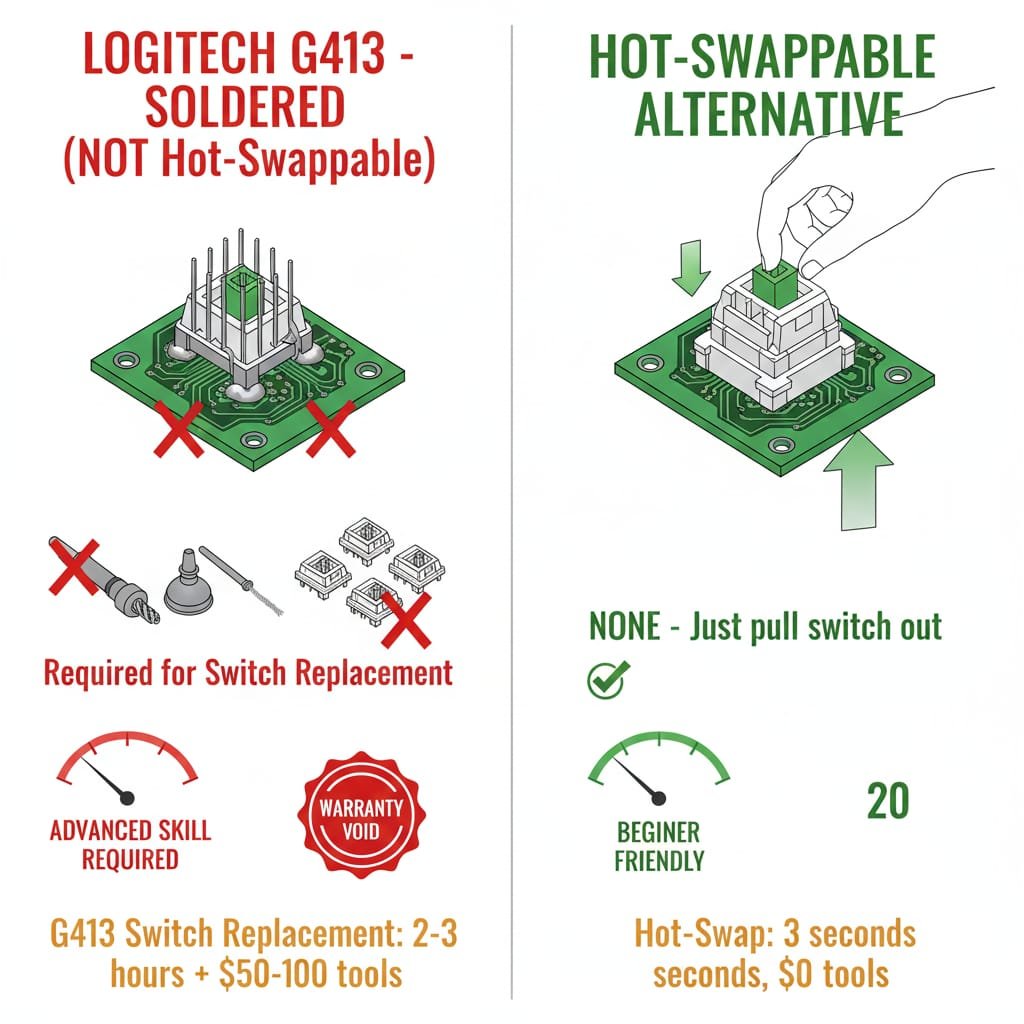
Short answer: No. The Logitech G413 is not hot-swappable. All switches are soldered directly to the PCB.
What Is Hot-Swappable?
Hot-swappable keyboards feature sockets allowing switch removal/replacement without soldering.
Why the Logitech G413 Cannot Be Hot-Swapped
Common searches:
- “is logitech g413 hot swappable” (20 searches/month)
- “is the logitech g413 hot swappable” (20 searches/month)
- “is the logitech g413 tkl se hot swappable” (20 searches/month)
The reality: All Logitech G413 switches are soldered directly to PCB. Replacing requires:
- Disassembling keyboard
- Desoldering all 104 switches
- Installing new switches
- Resoldering connections
Skill Level: Advanced (requires soldering station, solder sucker, experience).
Cost: $50–$100 for tools + switches.
Warranty: ❌ Voided by disassembly.
Why This Matters for G413 Owners
The G413’s soldered switches mean:
- ❌ Cannot easily replace failed switches
- ❌ Cannot customize switch feel without advanced soldering
- ❌ Limited long-term repairability
If you want hot-swappable keyboards, see our Evoworks Evo80 review which offers full switch customization.
Complete Logitech G413 Cleaning and Maintenance Guide
Why Clean Your Logitech G413 Keyboard?
Dust, crumbs, hair, oils accumulate causing:
- Sticky/unresponsive keys
- Reduced switch lifespan
- Unpleasant odors
- Unsightly grime
Recommended Cleaning Schedule
- Weekly: Compressed air dusting
- Monthly: Keycap removal and deep clean
- Annually: Full disassembly (advanced users)
Tools Required
- Compressed air canister
- Keycap puller (wire or plastic)
- Microfiber cloths (2–3)
- Isopropyl alcohol 70%+
- Small soft-bristle brush
- Bowl of lukewarm water + mild soap
Step-by-Step Cleaning Process
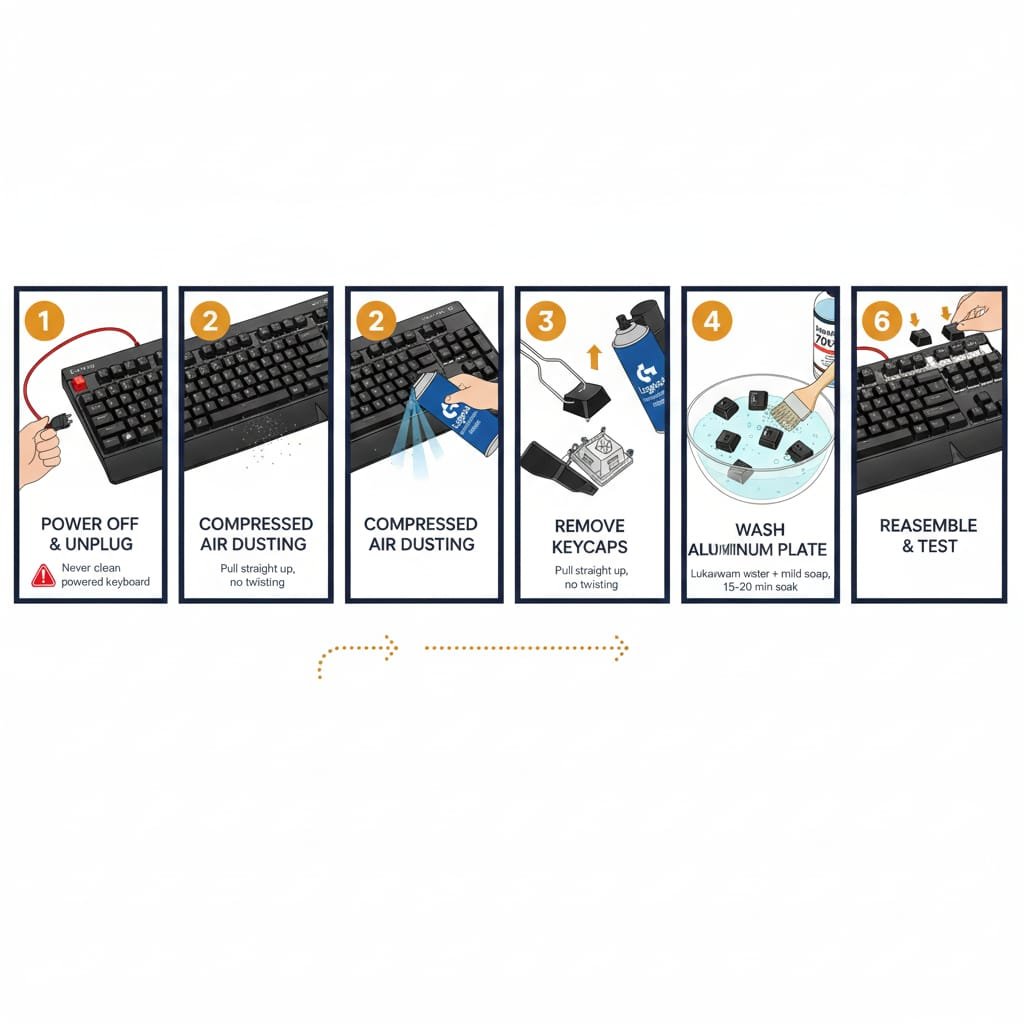
1. Power Off and Unplug
Critical: Never clean powered keyboard. Risk of short circuit.
2. Surface Dusting (Weekly)
- Hold keyboard upside down, shake gently
- Use compressed air between keys
- Wipe aluminum plate with dry microfiber cloth
3. Keycap Removal (Monthly)
- Slide wire loops under keycap edges
- Pull straight up with even pressure
- Avoid twisting (risks breaking stems)
- Be cautious with Romer-G stems on originals
4. Clean Keycaps
- Fill bowl with lukewarm water + 2–3 drops dish soap
- Soak keycaps 15–20 minutes
- Scrub with soft brush
- Rinse thoroughly
- Dry completely (24 hours air-dry)
Avoid: Hot water, abrasive cleaners, dishwashers.
5. Clean Aluminum Plate and Switches
- Use dry microfiber cloth on plate
- Use small brush on switch housings
- For sticky residue, dampen cloth with isopropyl alcohol
- Never spray liquid directly
6. Reassemble
- Ensure keycaps completely dry
- Press onto switches until click
- Test all keys
Fixing Logitech G413 Carbon Double-Typing
Issue: Key registers multiple inputs on single press.
Cause: Dust or oxidation on switch contacts.
Fix:
- Locate affected key
- Remove keycap
- Apply 2–3 drops 99% isopropyl alcohol into switch
- Rapidly press key 50–100 times
- Allow 2 hours to dry
- Test
Success Rate: 70% based on Reddit reports.
Spill Response (Emergency)
The G413 is NOT water-resistant.
- Unplug keyboard instantly
- Flip upside down to drain
- Remove all keycaps
- Dry visible moisture
- Allow 48–72 hours to air-dry
Critical: PCB damage likely from spills.
Logitech G413 Troubleshooting Common Issues
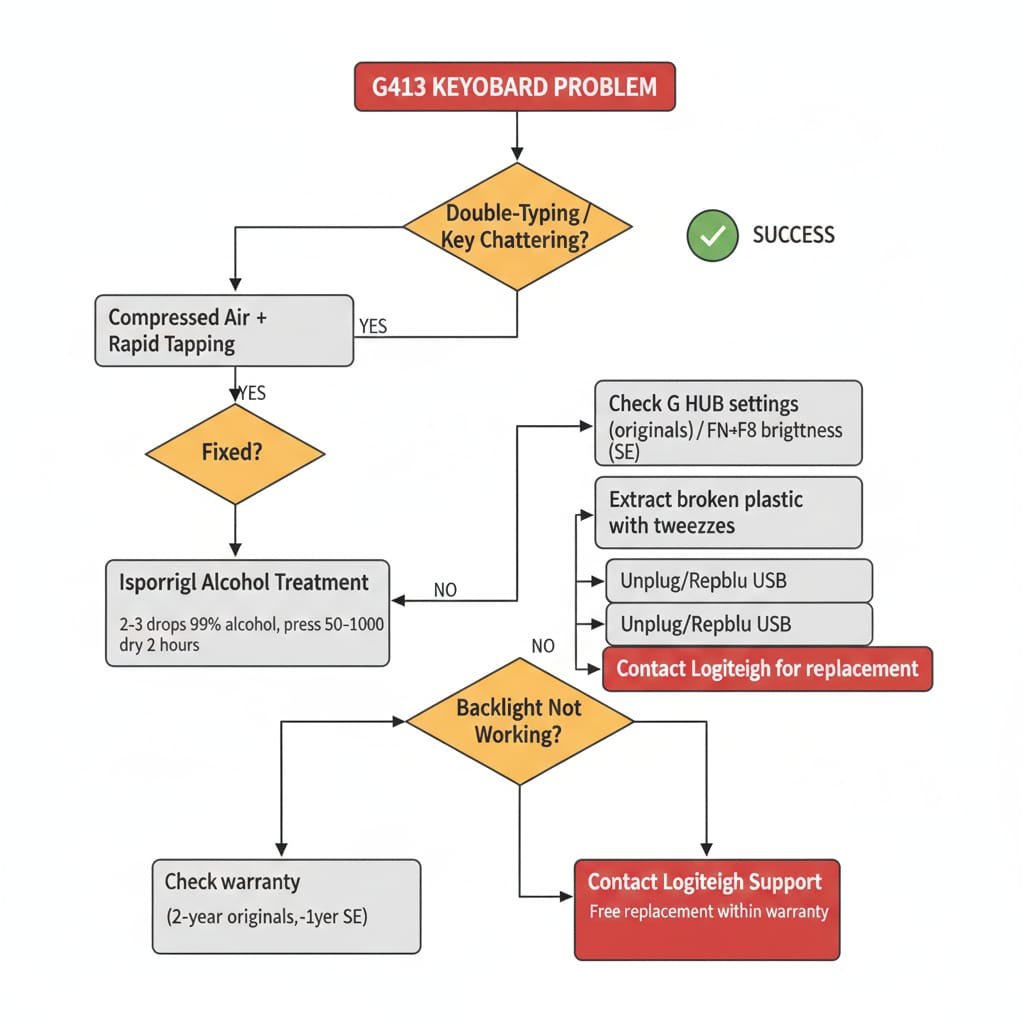
Issue 1: Double-Typing / Key Chattering
Symptom: Single press registers 2–3 times.
Affected Keys: Most common on N, D, Spacebar, Enter.
Cause: Dust in contacts or contact wear (originals after 2–3 years).
Solutions:
- Temporary: Compressed air + rapid tapping
- Permanent: Isopropyl alcohol cleaning or switch replacement
Warranty: Logitech covers within 2-year warranty (originals) or 1-year (SE).
Issue 2: Keycap Stems Breaking
Symptom: Keycap pops off easily. Broken plastic visible in switch.
Cause: Fragile Romer-G stem design.
Solutions:
- Use tweezers to extract broken plastic
- Purchase replacement keycaps from Logitech
- Contact support (often replaced free within warranty)
Prevention: Remove keycaps gently. Avoid twisting.
Issue 3: Logitech G413 Backlight Not Working
Symptom: LEDs dim, flicker, or die.
Cause: LED burnout, loose PCB connection, power delivery issue.
Solutions:
- Check G HUB settings (originals)
- FN + F8 to confirm brightness (SE)
- Unplug/replug USB cable
- Contact Logitech for replacement
Known SE Issue: Lighting resets to maximum on startup. No fix available.
Logitech G413 vs Logitech K270: Gaming Mechanical vs Office Wireless
Common cross-shopping question: Should I buy the Logitech G413 (mechanical gaming) or Logitech K270 (wireless membrane)?
| Feature | Logitech G413 SE | Logitech K270 |
|---|---|---|
| Type | Wired mechanical gaming keyboard | Wireless membrane office keyboard |
| Switches | Tactile mechanical (55g, 2.0mm actuation) | Rubber dome membrane (~65g) |
| Connectivity | Wired USB | 2.4 GHz wireless (NO Bluetooth) |
| Latency | 1ms (1000Hz polling) | ~8-12ms |
| Keycaps | Double-shot PBT | ABS plastic |
| Durability | 50M keystrokes (SE) | ~5M keystrokes |
| Gaming | ✅ Designed for gaming | ❌ Not suitable (membrane, lag) |
| Battery | N/A (wired) | 2× AAA (24 months claimed) |
| Price | $50-70 | $20-30 |
| Best For | Gaming, fast typing, tactile feedback | Light office work, budget wireless |
Verdict: The Logitech G413 is vastly superior for gaming due to mechanical switches with 1.5-2.0mm actuation distance (25-50% faster than membrane), lower latency, and better durability. While the Logitech K270 offers wireless convenience at half the price, it uses rubber dome membrane switches that lack tactile feedback and suffer from typing lag.
Choose G413 if: Gaming, programming, or heavy typing is your primary use.
Choose K270 if: You need wireless for casual office work and type <2 hours/day.
Logitech G413 Comparisons & Alternatives
Logitech G213 vs G413
Common search: “logitech g213 vs g413” (20 searches/month)
| Feature | G213 | G413 |
|---|---|---|
| Switch Type | ❌ Mech-Dome (membrane) | ✅ Mechanical |
| RGB | ✅ Full RGB | ❌ Fixed color |
| Price | ~$40 | ~$70 (SE) |
| Best For | Budget gamers | Mechanical feel |
Verdict: G413 wins on typing feel. G213 wins on RGB.
Logitech G413 vs Keychron C3 Pro
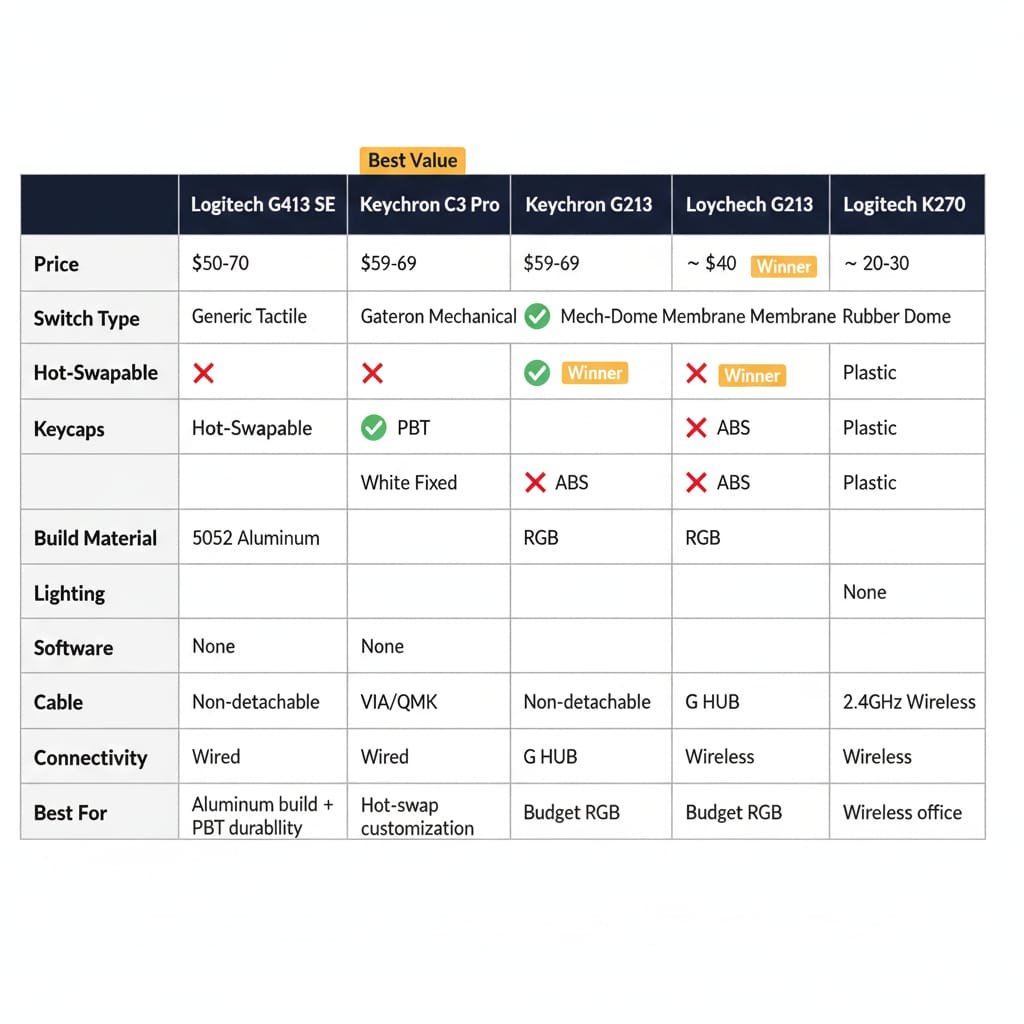
Common cross-shopping question: Should I buy the Logitech G413 SE or Keychron C3 Pro?
| Feature | Logitech G413 SE | Keychron C3 Pro |
|---|---|---|
| Price | $50-70 | $59-69 |
| Switch Type | Generic tactile (soldered) | Gateron mechanical (hot-swap) |
| Hot-Swappable | ❌ No | ✅ Yes |
| Keycaps | ✅ Double-shot PBT | ❌ ABS |
| Build Material | 5052 aluminum alloy | Plastic frame |
| Lighting | White (fixed) | RGB (customizable) |
| Software | ❌ None | ✅ VIA/QMK |
| Cable | Non-detachable | USB-C detachable |
| Best For | Aluminum build, PBT durability | Customization, hot-swap modding |
Verdict: G413 SE wins on build quality (aluminum, PBT keycaps). Keychron C3 Pro wins on features (hot-swap, RGB, programmability, detachable cable). For $10-20 more, Keychron offers significantly more flexibility for future customization.
Is the Logitech G413 Good in 2025?
Short answer: Yes, for budget-conscious buyers accepting limitations. The Logitech G413 SE/TKL SE offers solid build quality ($50-70) but lacks features like hot-swap, RGB, and software that competitors now provide.
✅ BUY Logitech G413 SE / TKL SE IF
✅ Budget is under $60 and you need mechanical keyboard NOW
✅ You value 5052 aluminum alloy build + double-shot PBT keycaps
✅ Plug-and-play simplicity (no software) is a plus
✅ Office/work environment (quiet 55g tactile switches, professional look)
✅ First mechanical keyboard and want safe, mainstream choice
❌ SKIP Logitech G413 IF
❌ You want hot-swap switches for future customization
❌ RGB lighting is non-negotiable
❌ Macro recording/software remapping needed
❌ Want wireless connectivity (2.4GHz/Bluetooth)
❌ Need N-key rollover for complex gaming inputs
Final Verdict

Logitech G413 SE / TKL SE: 7.5/10
Solid budget mechanical gaming keyboards with premium materials (aluminum, PBT) but dated feature set. Acceptable value under $60 if you accept soldered switches and no RGB.
Original Carbon/Silver: 6/10 (Used)
Superior Romer-G switches (1.5mm actuation, 45g force) and USB passthrough, but double-typing reliability concerns and scarcity make them risky unless deeply discounted.
Bottom Line: If you want simple, durable, no-frills mechanical keyboard with aircraft-grade aluminum for gaming/typing, G413 SE delivers. Want hot-swap customization? The Evoworks Evo80 offers superior modding potential.
Logitech G413 Frequently Asked Questions
Is the Logitech G413 mechanical?
Yes. All variants use mechanical switches (Romer-G or generic tactile).
Can you change the color of the Logitech G413?
No. Backlight color is fixed (red for Carbon, white for SE/Silver). See full lighting guide above.
Is the Logitech G413 hot-swappable?
No. All switches are soldered. See detailed hot-swap section above.
What switches does the Logitech G413 have?
Romer-G Tactile (originals)
Generic tactile (SE models)
How to change brightness on Logitech G413?
FN + F7 (decrease) or FN + F8 (increase). Originals also support G HUB.
Can you turn off the backlight on Logitech G413?
Yes. Reduce brightness to 0% or use FN + F9 (SE) to cycle to “Off”.
Why does the Logitech G413 have two USB cables?
One powers keyboard; second enables USB 2.0 passthrough port (originals only).
Does the Logitech G413 have onboard memory?
Limited. Originals store lighting profiles only. SE has none.
How to clean Logitech G413 keyboard?
Power off, unplug, use compressed air. For deep clean, remove keycaps, wash in soapy water, wipe plate with microfiber cloth.
Is Logitech G413 waterproof?
No. No water resistance. Spills will damage PCB.
Is Logitech G413 good?
Yes, for budget gaming/typing. G413 SE offers excellent value at $50–$70. Originals have reliability concerns after 2–3 years.
Is the Logitech G413 good for gaming?
Yes. Low latency, responsive switches, solid anti-ghosting.
How loud is the Logitech G413?
Moderate. Quieter than clicky switches, suitable for offices.
What is the Logitech G413 SE switch type?
Generic tactile switches (Long Hua, similar to Cherry MX Brown).
Related Keyboard Reviews & Resources
Budget Mechanical Keyboards
- Evoworks Evo80 Review — Hot-swappable TKL alternative
- ZH870 Keyboard Review — Budget gasket mount
- Cherry KW X ULP Review — Ultra-slim mechanical
Gaming Keyboard Alternatives
- Logitech G213 vs G413 — Membrane vs mechanical
- Corsair K55 RGB Review — Budget gaming membrane
- Corsair K63 Wireless Review — Wireless TKL
- Corsair K65 Series Review — Compact mechanical
- Corsair K95 Review — Full-size RGB
- Corsair K100 Review — Premium flagship
Wireless Keyboard Alternatives
- Logitech K270 Review — Budget wireless
- Logitech K350 Review — Ergonomic wave
- Logitech K750 Review — Solar-powered
- Logitech K800 Review — Illuminated wireless
- Apple Magic Keyboard 2 Review — Mac-optimized
External Resources
Conclusion:
The Logitech G413 series represents performance minimalism in an RGB-saturated era. Original Carbon/Silver models (2017) delivered exceptional value with Romer-G switches and aluminum construction, but suffer documented long-term reliability issues.
SE/TKL SE models (2022–2025) offer unbeatable value at $50–$70 with PBT keycaps and solid build quality, but sacrifice enthusiast features competitors now include.
Final Recommendation:
✅ Buy G413 SE/TKL SE if you prioritize build quality over customization and accept no RGB
❌ Avoid originals unless new with warranty or >40% discount
🔁 Consider alternatives (Keychron C3 Pro, GMMK 2) for hot-swap/RGB
For budget-conscious gamers and typists seeking reliable, no-nonsense mechanical keyboard in December 2025, the Logitech G413 SE remains a safe bet.
Legal Disclaimer:
This article aggregates user-reported issues and publicly available information about the Logitech G413 Mechanical Gaming Keyboard The content is provided for informational purposes only and does not represent the views or official stance of Logitech or any retailer. We do not claim that the described defects or failures affect all units, nor do we guarantee the accuracy of individual user reports. Readers should verify information independently and consult the manufacturer or authorized service providers for official guidance. This site is not liable for any decisions made based on the content provided herein.